Admin User Guide · Responder Management Module

Every person
in the field.
One platform.

The AWE Initiative Responder Management module gives you total command over every person you deploy — whether they carry a firearm, a spanner, a stethoscope, or a sales brochure. Manage, monitor, brief, and debrief any field-based workforce from a single admin portal.

🛡️ Security & Armed Response 🔧 Technical Field Teams 🚑 Emergency Medical 🚗 Drivers & Logistics 💼 Sales Representatives 🔌 Electricians & Plumbers 🏛️ Municipal Services 🤝 NGO Field Workers
9
Core modules
Responder types
Live
Real-time tracking
PSIRA+
Cert management
Scroll to begin ↓
Overview

Responder Management at a glance

Nine integrated modules covering every dimension of field team management — from onboarding to mission debrief.
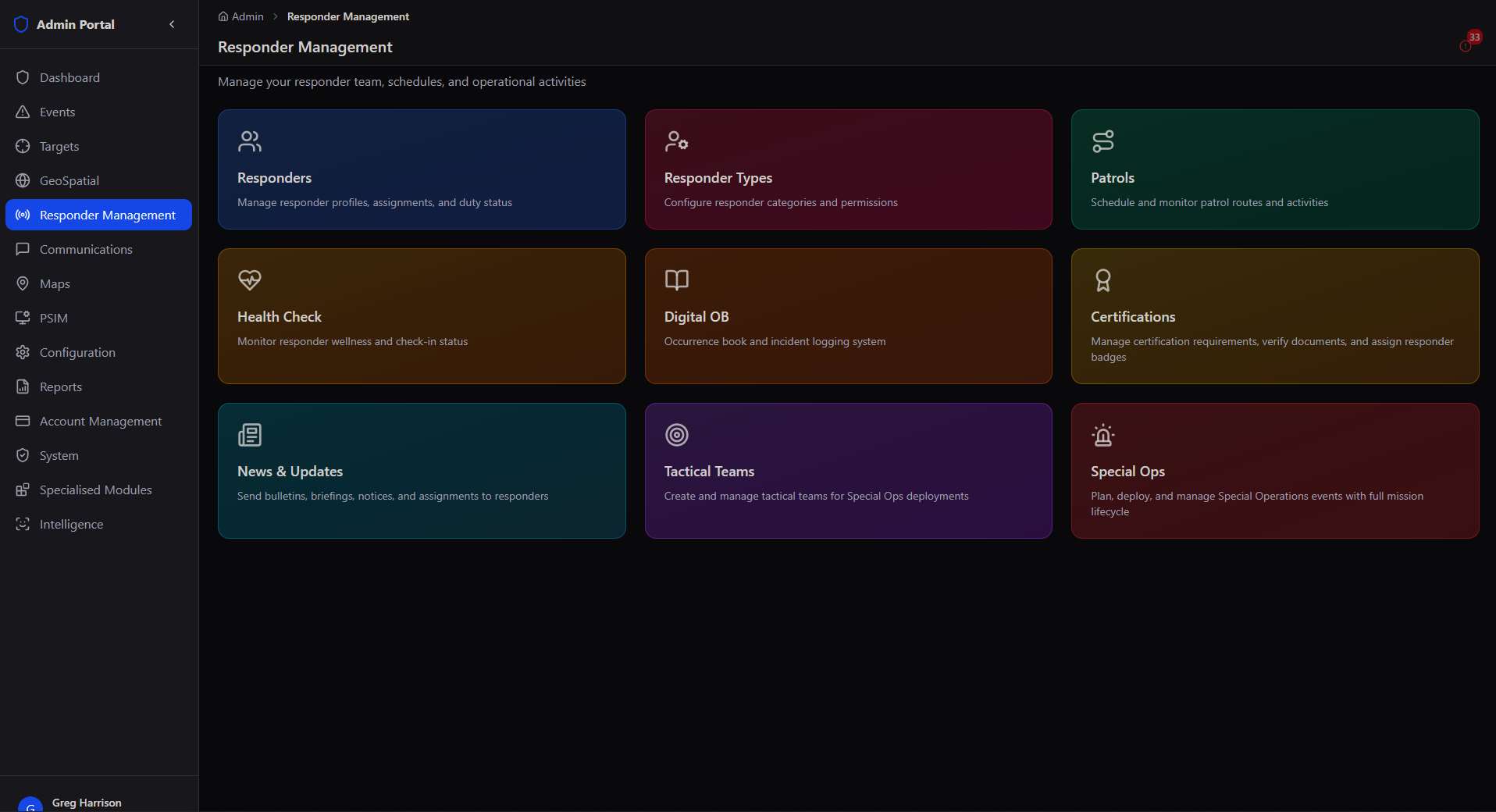
Responder Management dashboard
Responder Management → main dashboard: nine integrated sub-modules in a single control surface
👤
Responders
Manage profiles, assign roles, control duty status, and track performance for every person in your workforce.
⚙️
Responder Types
Define unlimited custom categories from SAPS to Sales Reps. Configure icons, colours and permissions per type.
🗺️
Patrols
Build geo-pinned route maps with checkpoints, schedule shifts, and track completion rates in real time.
💚
Health Check
Automated wellness check-ins with configurable intervals, alert thresholds, and overdue escalation.
📖
Digital OB
A digital occurrence book — structured incident logging with media attachments, geo-tagging, and PDF export.
🏆
Certifications
Define certification requirements per responder type, upload and verify documents, track expiry and compliance.
📢
News & Updates
Broadcast bulletins, assignments, and notices to all or specific responders with read-receipt tracking.
🎯
Tactical Teams
Build and manage specialist tactical teams — from Rapid Response to Medical — ready for Special Ops deployment.

Designed for any workforce. While security and emergency services are natural starting points, the Responder Management module is built to manage any person who operates in the field — technical contractors, sales teams, municipality workers, NGO volunteers, and more. If they leave a building and need to be tracked, briefed, or coordinated, this module handles it.

Module 01

Responders

Manage responder profiles, assignments, duty status, and performance from a single view.

The Responders module is your master roster — every person who can be activated, dispatched, or tracked through the platform is managed here. Think of it as the HR system, scheduling tool, and deployment dashboard fused into one.
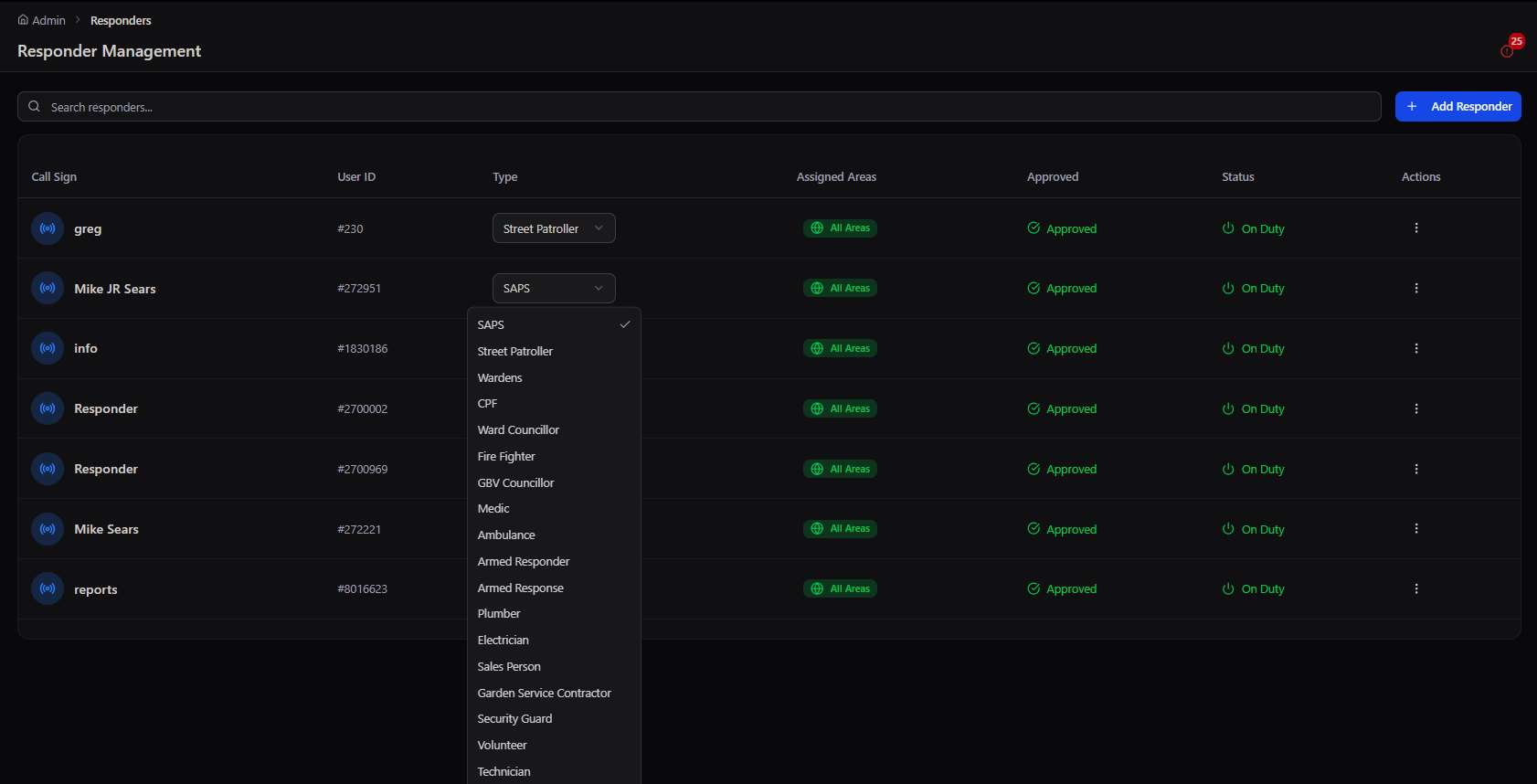
Responders table with the responder type selector open
Responders → master roster table, with the responder Type selector open mid-edit

The Responder Profile

Each responder has a rich profile that goes far beyond a name and number. The profile aggregates real-time operational data, historical performance, and compliance status in one view accessible to any authorised admin.

📋
Full profile overview
Name, contact details, call sign, responder type, approval status, service areas, and duty status — all editable and instantly visible to control room operators.
📊
Performance statistics
Live KPIs: incidents attended, response rate, patrols completed, and compliance score. Track individual performance trends over time for appraisals and deployment decisions.
📍
Last known location
GPS-stamped with timestamp — immediately know where any responder was last active, right from their profile card without switching to the map.
🗺️
Assigned response areas
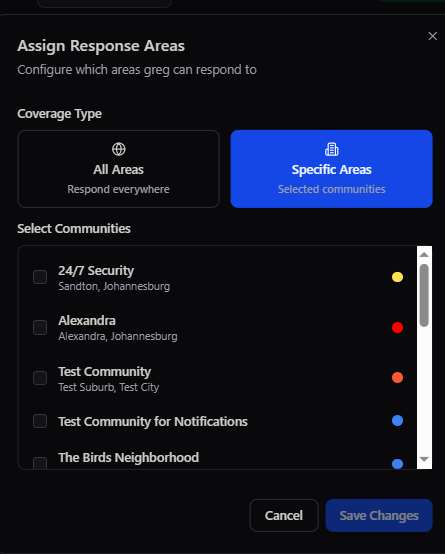
Configure coverage as All Areas (global) or Specific Communities (selected sites). One responder can cover multiple communities simultaneously, or be locked to a single zone.

Responder Status System

StatusWhat it meansControl room visibilityDispatch eligible
On DutyActive, available, GPS tracking liveGreen dot on mapYes
Off DutyNot available, tracking pausedGrey, last position shownNo
ApprovedProfile verified, ready to go on dutyActive rosterWhen on duty
PendingProfile submitted, awaiting admin reviewPending queueNo
🚀 Who uses this module? Deployment spectrum
Security Guards Armed Response SAPS Personnel Paramedics / EMTs Field Technicians Electricians Plumbers Delivery Drivers Sales Reps Municipal Inspectors NGO Volunteers Pest Control Teams Event Staff Estate Maintenance

Any person. Any role. Any industry. The Responders module has no hardcoded role assumptions. A "responder" is simply any person you need to activate, track, or coordinate in the field. A building maintenance company managing 12 plumbers across Johannesburg uses exactly the same module as a security company managing 200 armed guards — and gets the same real-time visibility.

Module 02

Responder Types

Define unlimited custom categories of personnel — tailor the platform to your exact workforce structure.

Responder Types are the foundation of your platform configuration. They define who your people are, what icons and colours represent them on the map, and what permissions they carry. You are not limited to any preset list — create whatever categories match your operation.

Types available out-of-the-box
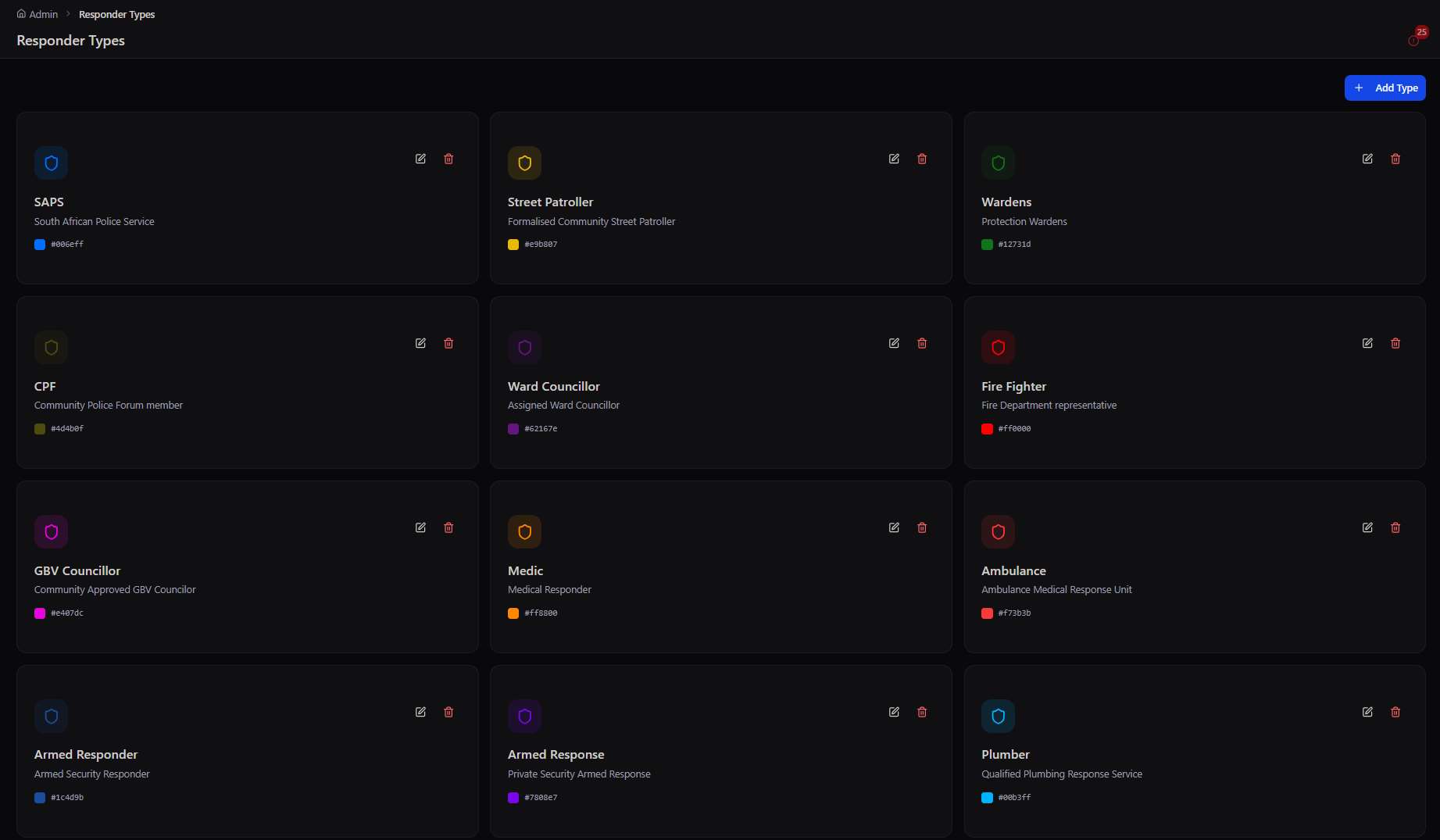
🛡️ SAPS
South African Police Service
🚶 Street Patroller
Formalised community street patroller
🏛️ Ward Councillor
Assigned ward councillor
👨‍👩‍👧 CPF
Community Policing Forum member
🚑 Medic
Medical responder
🚒 Ambulance
Ambulance medical response unit
🔫 Armed Responder
Armed security responder
🚗 Armed Response
Private security armed response
🔧 Plumber
Qualified plumbing response service
Responder Types configuration grid
Responder Types → the configuration grid: each category carries its own icon, colour, and permissions
Create Responder Type modal
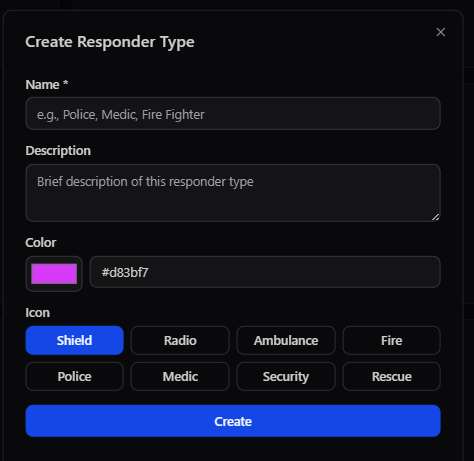
Create Responder Type → name, colour, and icon picker for a new category
Assign Response Areas modal
Assign Response Areas → scope a responder to all areas or specific communities

Creating a custom type

The Add Type form takes under 60 seconds to complete. Every custom type you create becomes immediately available to assign to responders and appears in all filter dropdowns, dispatch workflows, and reporting dashboards.

1

Name the type

Use clear, descriptive names. Examples: "Solar Technician", "Garden Service Contractor", "Undercover Agent", "Sales Territory Rep".

2

Add a description

Brief context for admin users. Useful when multiple admins manage the portal and need to understand distinctions between similar types.

3

Choose a colour

Each type gets a unique hex colour that appears as their map marker colour. Use distinct colours to differentiate types at a glance on the live map.

4

Select an icon

Choose from Shield, Radio, Ambulance, Fire, Police, Medic, Security, or Rescue icons. The icon appears inside the map marker for instant field identification.

🚀 Custom types in the wildReal examples from deployments
Solar Installation Team GBV Councillor Meter Reader Food Delivery Driver Security Guard Sales Person Garden Service Volunteer Technician Electrician Fire Fighter Riot Control Unit

One platform, any workforce. A logistics company tracking 30 delivery drivers creates "Driver" and "Supervisor" types. A facilities management company creates "Electrician", "Plumber", "HVAC Tech". A non-profit creates "Field Worker" and "Regional Coordinator". The type system is the key that unlocks the platform for every industry.

Module 03

Patrols

Design geo-pinned routes, schedule recurring patrols, and track completion in real time with full analytics.

The Patrols module turns the abstract concept of "covering an area" into a structured, accountable, data-generating activity. Whether you're scheduling security rounds at an estate, daily inspection routes for a technical team, or territory coverage for a sales force — Patrols brings discipline and proof to field operations.

Patrol Route Editor

Build patrol routes directly on an interactive map. Drop checkpoints at specific physical locations — entrances, equipment rooms, high-risk zones, client sites. Responders must physically scan or GPS-confirm each checkpoint as they pass it. The system knows if they skipped one.
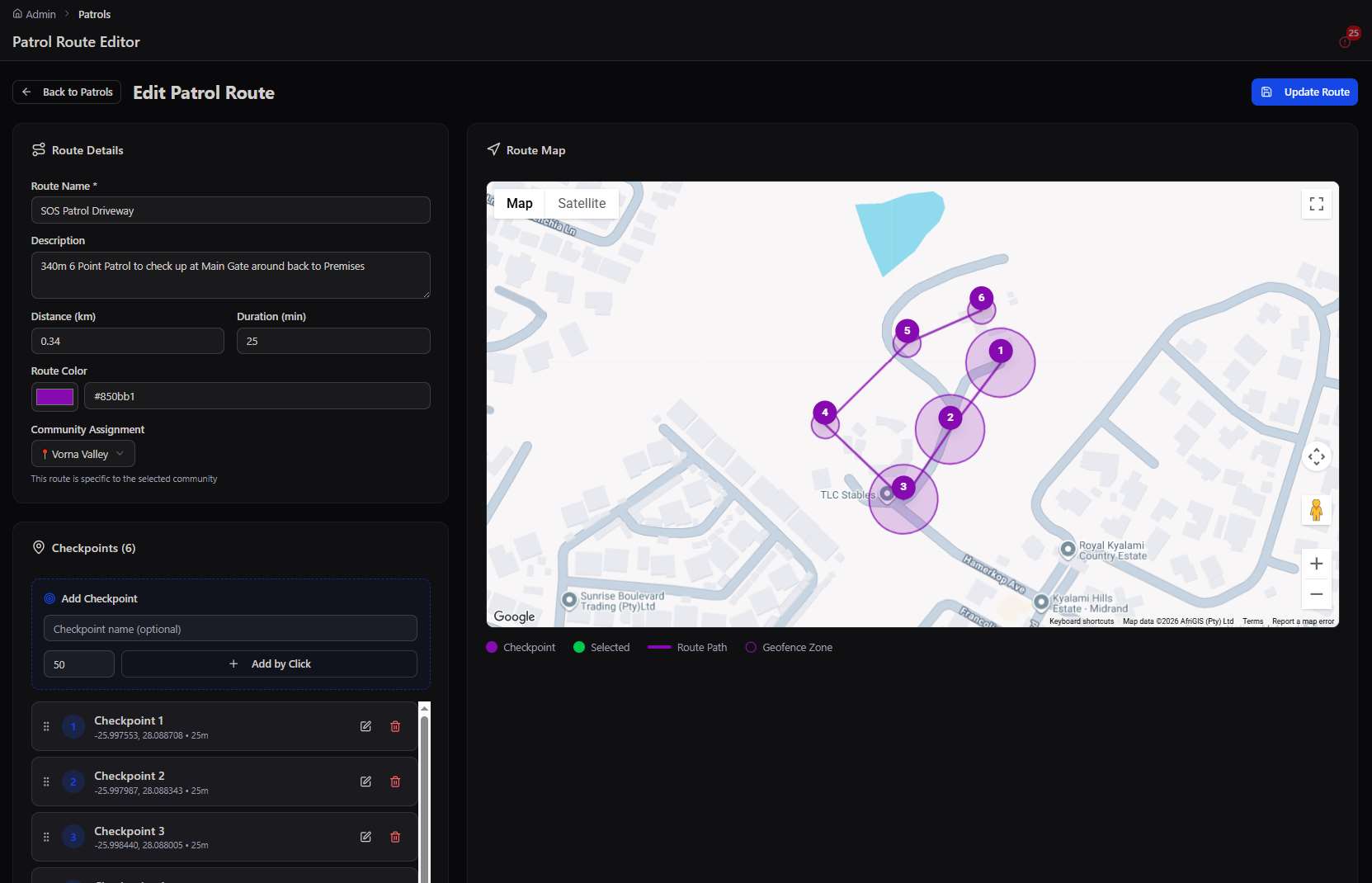
Patrol Route Editor with live map
Patrol Route Editor → checkpoints dropped on the live map with per-point geofence radii and a colour-coded route
📍
Visual route mapping
Click directly on the map to place checkpoints. Draw the route path between them. Assign a geofence radius per checkpoint so the system knows when a responder is "at" that point — no QR codes or NFC tags required.
🏘️
Community assignment
Each route is linked to a specific community or site. A responder covering multiple estates sees each estate's routes separately. Colour-code routes to distinguish them at a glance on the map.
📅
Patrol scheduling
Create recurring schedules: assign a specific responder to a route on selected days, at specific times, with advance notification reminders. The system pushes a reminder to the responder's app before the shift starts.
📷
Photo evidence at checkpoints
Require responders to submit a photo when they complete a checkpoint. Photos are geo-stamped and timestamped — irrefutable proof of presence. View all checkpoint photos per patrol from the history log.

Patrol Analytics

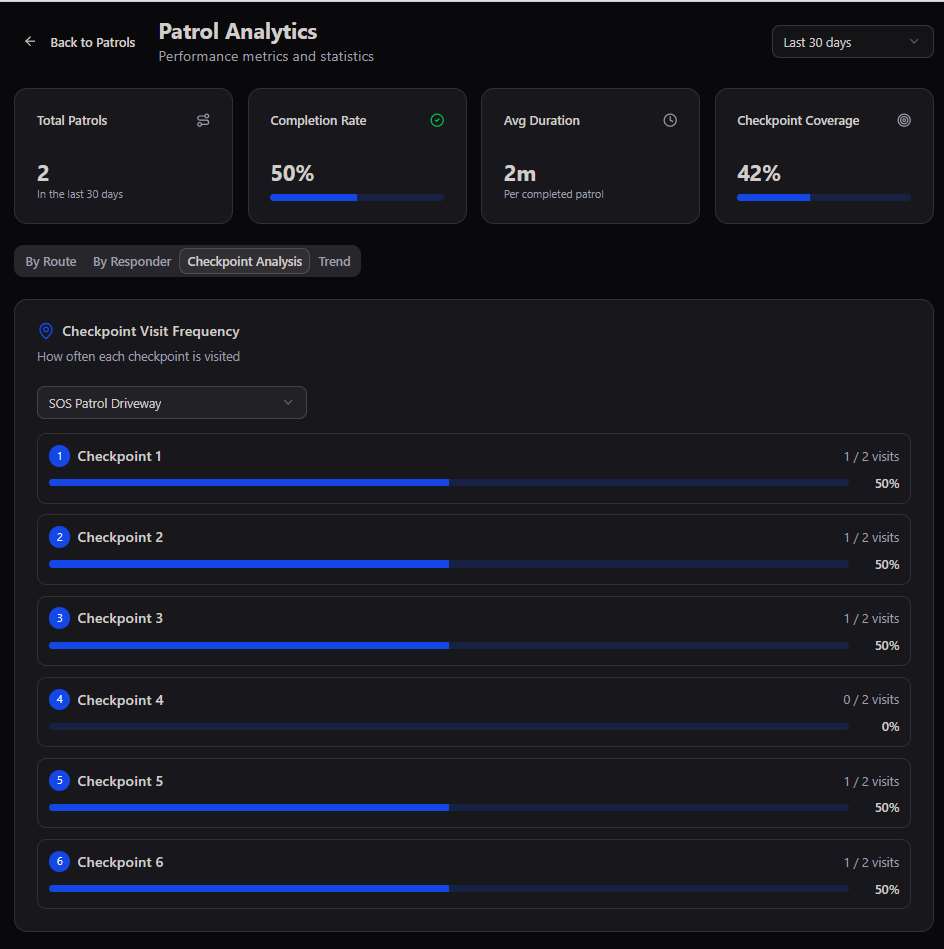
Every patrol generates structured data. The analytics dashboard aggregates this across all routes, responders, and time periods — making it a powerful tool for SLA reporting, workforce performance reviews, and operational gap analysis.
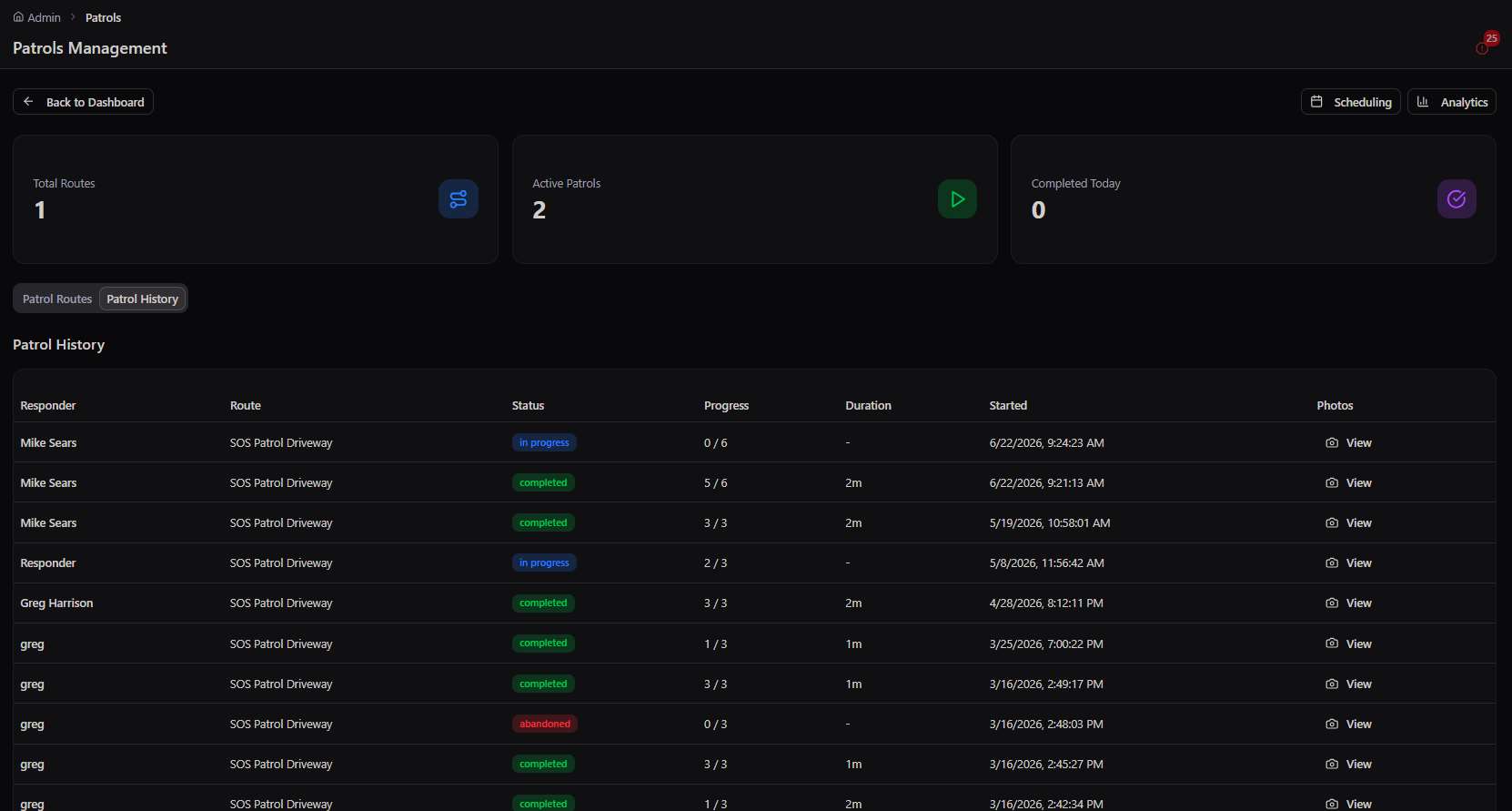
Patrols Management with patrol history
Patrols Management → patrol history log with status, progress, checkpoint counts, and per-patrol evidence
Patrol Analytics dashboard
Patrol Analytics → completion rate, average duration, and per-checkpoint visit frequency
50%
Average completion rate visible at a glance
2m
Average patrol duration tracked per route
42%
Checkpoint coverage visible per responder

Analytics views include: By Route (which routes are being completed vs skipped), By Responder (individual compliance scores), Checkpoint Analysis (frequency of visits per checkpoint — reveals blind spots), and Trend (performance over time). Export any view for SLA reporting or client billing.

🚀 How different industries use PatrolsDeployment spectrum
Security rounds at estates Daily equipment inspections Sales territory coverage Municipal infrastructure checks Meter reading routes Hospital floor rounds Pest control site visits Delivery route verification

Proof of work for any field operation. A facilities management company uses Patrol Analytics to prove to a shopping centre client that all 47 maintenance checkpoints were visited on schedule — with photos. A security company uses completion rate data as the basis for responder performance bonuses. Sales managers use territory coverage maps in weekly review meetings.

Module 04

Health Check

Automated wellness monitoring for field personnel — because a missed check-in can be the first sign something is wrong.

The Health Check module is a live wellness monitoring system for any responder on duty. At configurable intervals, the system prompts each active responder to confirm they are safe and operational. Missed check-ins trigger escalating alerts — giving supervisors early warning before a situation becomes critical.
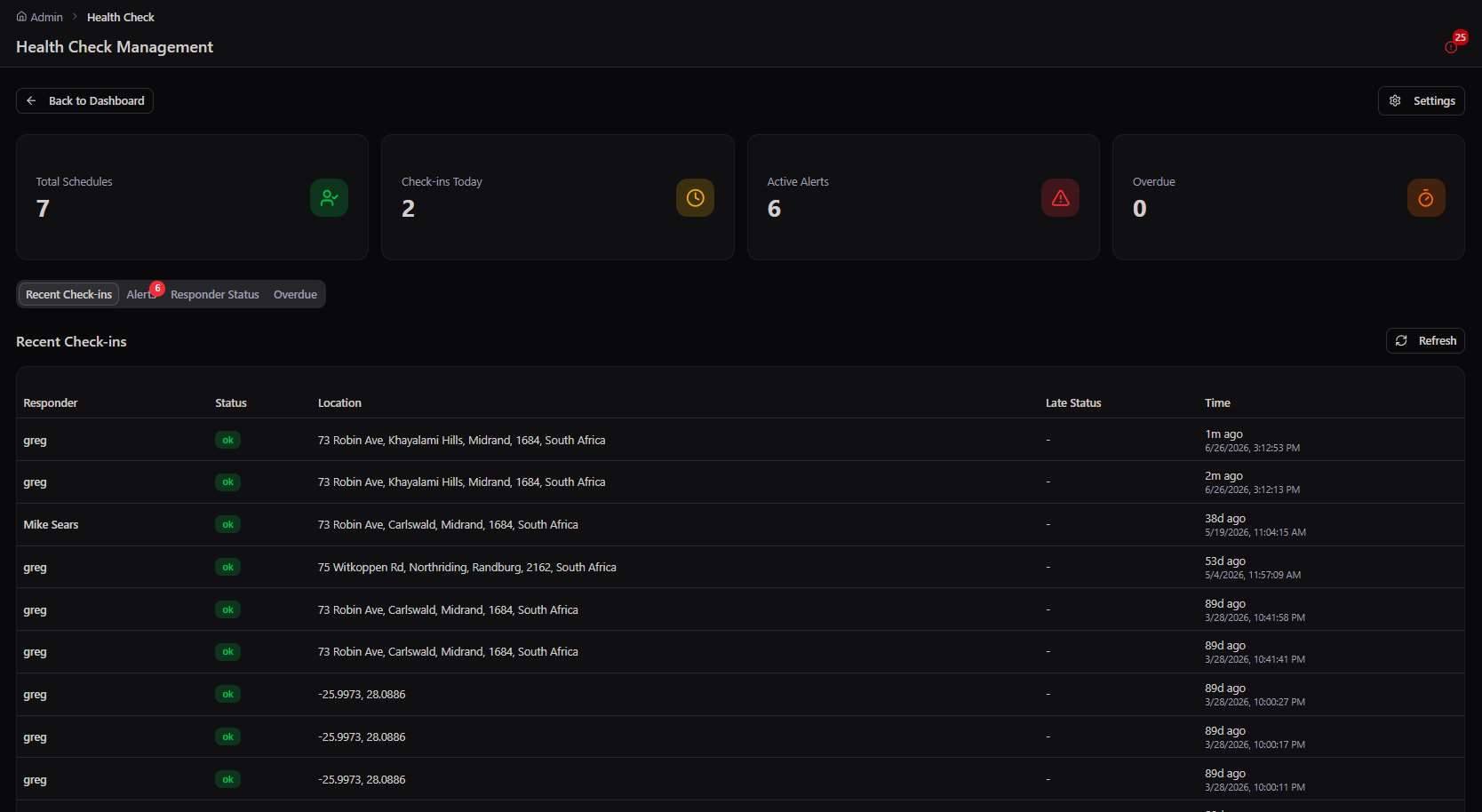
Health Check Management dashboard
Health Check Management → live check-in board with schedules, active alerts, overdue count, and recent check-ins
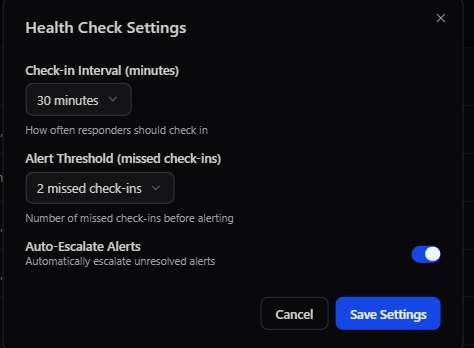
Health Check Settings modal
Health Check Settings → check-in interval, missed-check alert threshold, and auto-escalation
⏱️
Configurable check-in intervals
Set check-in prompts every 15, 30, 45, or 60 minutes. Adjust per shift type — a lone worker on a night patrol needs more frequent check-ins than a team during daytime operations.
🚨
Alert thresholds
Define how many missed check-ins trigger an alert. Default: 2 missed check-ins before an alert is raised. Every active alert is visible in the Health Check dashboard with the responder's last known location.
↗️
Auto-escalation
Enable automatic escalation so unresolved alerts rise up the command chain without manual intervention. Critically important for lone worker safety compliance in occupational health frameworks.
📊
Responder Status Board
A real-time grid showing every active responder's check-in status — green, late, or alert. Filter to show only responders with active alerts. Instantly identify who needs a welfare call.

Health Check Dashboard at a glance

Dashboard panelWhat it showsWhy it matters
Total SchedulesNumber of active check-in schedules runningConfirm all expected shifts are being monitored
Check-ins TodayTotal successful check-ins in the current periodVolume indicator — more check-ins = more active coverage
Active AlertsNumber of currently unresolved missed check-insYour immediate action queue
OverdueResponders past their check-in window with no responseEscalate immediately — these represent potential welfare incidents
🚀 Welfare monitoring beyond securityDeployment spectrum
Lone workers (health & safety compliance) Night shift security Remote site technicians Social workers on home visits Elderly care field staff Undercover personnel Hazardous environment workers

POPIA note: Health check responses are classified as health information under POPIA Section 26 (special personal information). Access must be restricted to direct supervisors and HR. Enable RBAC controls to ensure check-in data is not visible to general operators. See the POPIA Compliance Package for full guidance.

Module 05

Digital OB — Occurrence Book

A structured digital incident log that replaces paper occurrence books with searchable, exportable, media-rich entries.

The Digital Occurrence Book (OB) is the platform's formal incident record system. Every entry is timestamped, geo-tagged, categorised, and linked to the responder who created it. Entries can carry photo, video, and document attachments. The entire OB is searchable, filterable, and exportable as PDF or CSV for SAPS handover, insurance claims, or client reporting.
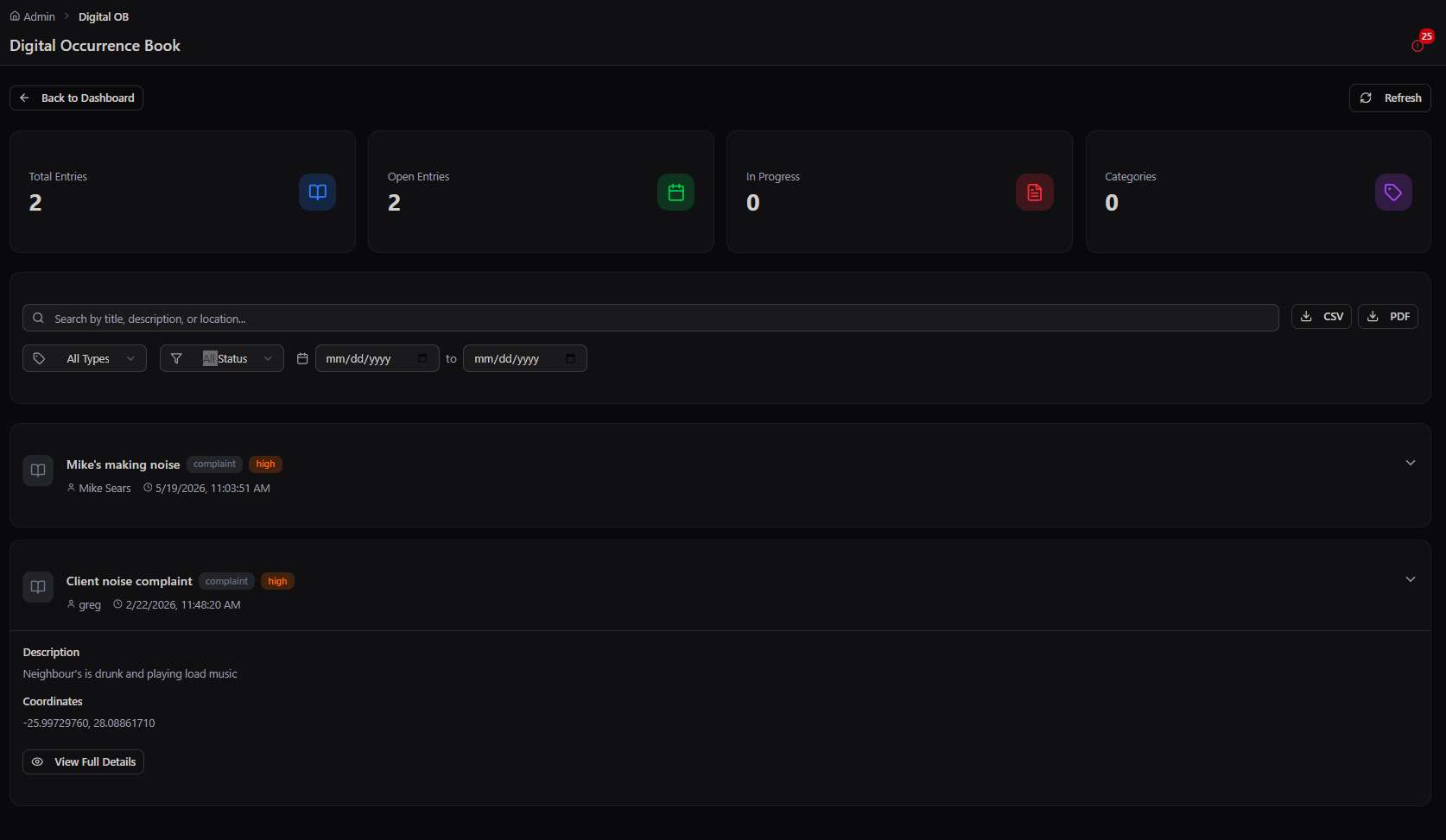
Digital Occurrence Book entry list
Digital OB → the occurrence book: structured, priority-tagged entries with media, search, filters, and PDF/CSV export
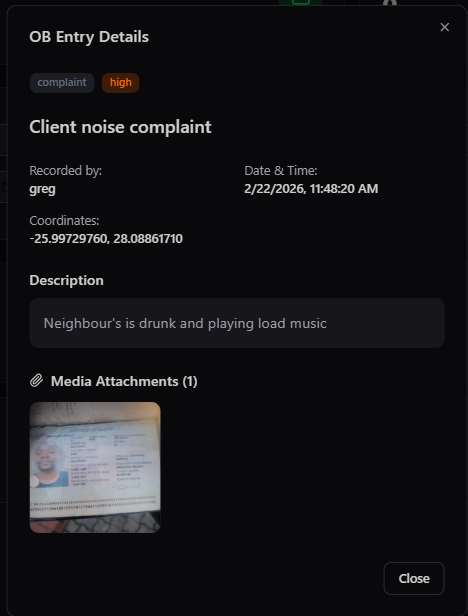
OB Entry Details
OB Entry Details → a compliance entry with GPS coordinates, timestamp, description, and media attachments
📝
Structured entries
Each OB entry captures: title, type (complaint, incident, observation), priority level, full description, geo-coordinates, recording officer, and date/time. Nothing is lost in an unstructured narrative.
📎
Media attachments
Attach photos, videos, or documents directly to an OB entry. All media is stored on the platform with the entry — no separate file management. Media can be viewed inline or downloaded.
🔍
Search & filter
Search all OB entries by title, description, or location. Filter by entry type, status, priority, or date range. Quickly surface relevant records when preparing a legal handover or management report.
📤
Export to PDF or CSV
One-click export for any view — current filter applied. PDF exports are formatted for official submission. CSV exports for data analysis. Essential for SAPS case files, insurance submissions, and SLA reporting.

OB entry types

⚠️ Incident
Active event requiring response or investigation
📋 Complaint
Formal complaint recorded for follow-up
👁️ Observation
Noted situation, no immediate action required
📌 Notice
Formal notice or instruction recorded
🔧 Maintenance
Fault or service requirement noted
🚀 OB use beyond securityDeployment spectrum
SAPS handover documentation Insurance claim evidence Facilities fault logging Delivery exception reporting Site inspection records Customer complaint logging Field service job records Municipal issue tracking
Module 06

Certifications

Define requirements, collect documents, verify compliance, and never deploy an uncertified responder again.

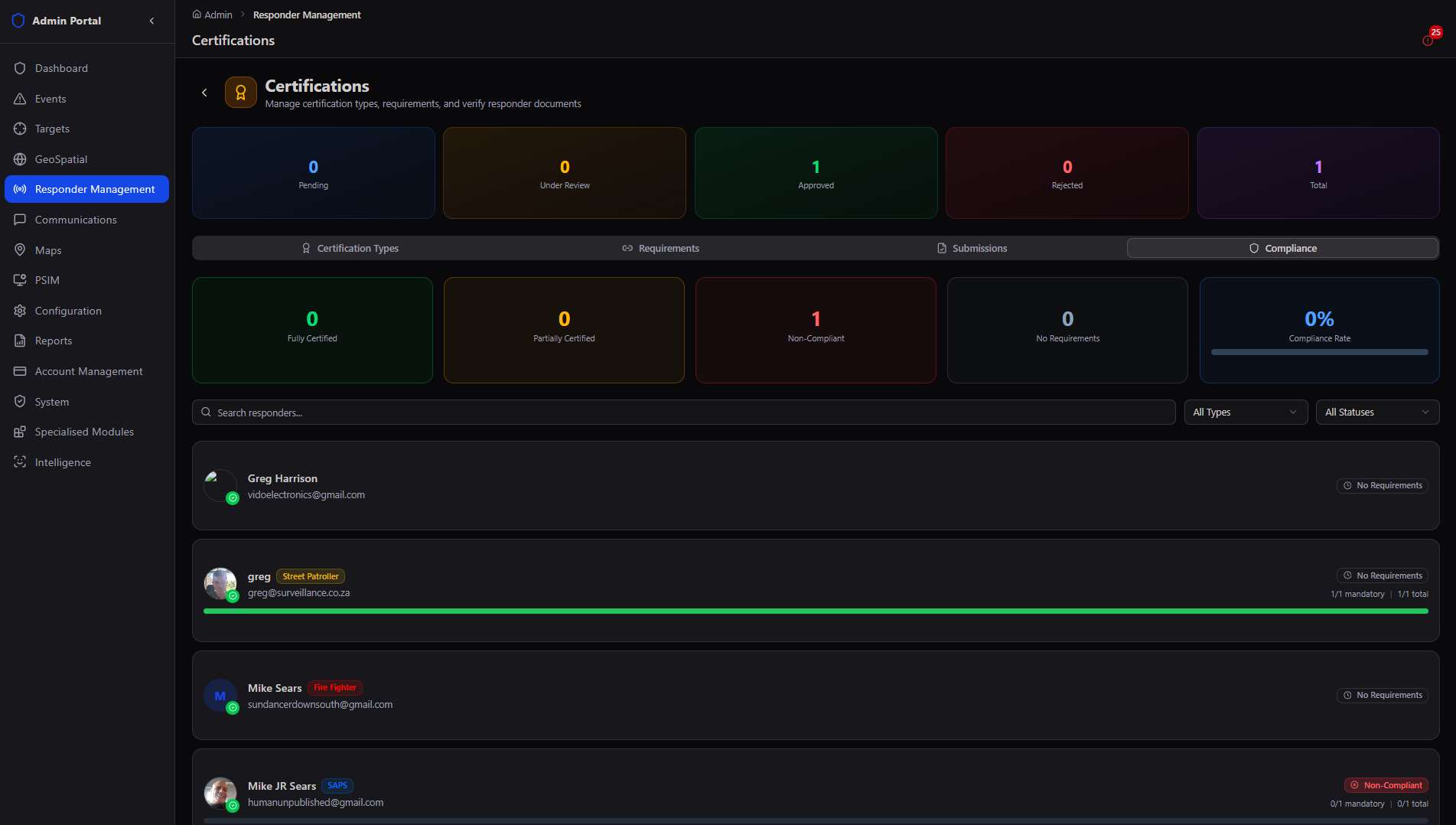
The Certifications module is a structured document management and compliance tracking system for your workforce. Define which certifications are mandatory for each responder type, collect document submissions via the app, review and approve or reject them, and track organisation-wide compliance rates. When a certificate approaches expiry, the system alerts both the responder and admin.
Certifications compliance dashboard
Certifications → compliance overview across types, requirements, submissions, and organisation-wide status
Add Certification Type modal
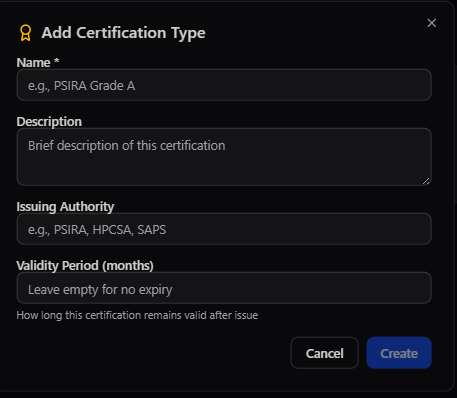
Add Certification Type → define a qualification, issuing authority, and validity period
Review Certification Submission modal
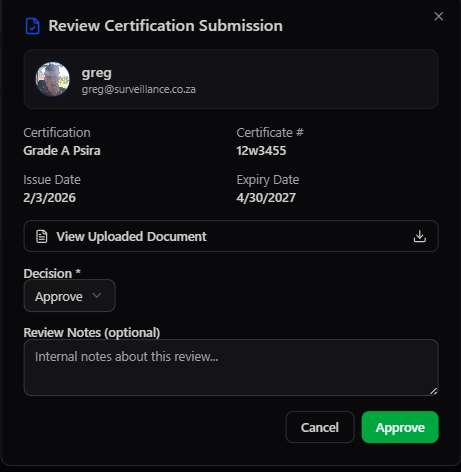
Review Submission → verify the uploaded document and approve or reject the certificate
📋
Certification types
Define as many certification types as needed — PSIRA Grade A, First Aid Level 2, Driver's Licence, SSETA, Gas Safety Certificate, Food Handler's Licence. Specify the issuing authority and validity period in months.
🎯
Requirements per type
Link certification requirements to responder types — CPF members require different certs than Armed Responders. Mark requirements as Mandatory (blocks deployment if non-compliant) or Optional.
Submission & review workflow
Responders submit certificates via their app. Each submission arrives in the admin portal for review — you can view the uploaded document, check certificate number and expiry, then Approve or Reject with notes.
📊
Compliance dashboard
Organisation-wide view: Fully Certified, Partially Certified, Non-Compliant, No Requirements. Compliance rate displayed as a percentage. Click any status to see the underlying responders and their specific gaps.

Compliance status definitions

StatusMeaningDispatch impact
Fully CertifiedAll mandatory requirements met and currentFull deployment
Partially CertifiedSome mandatory requirements metRestricted deployment
Non-CompliantMandatory requirement missing or expiredBlocked from deployment
No RequirementsNo mandatory certs defined for this typeFull deployment
🚀 Certifications across industriesDeployment spectrum
PSIRA security grades First Aid / BLS Driver's licence categories Gas safety certificates Food handler's licence SSETA/SASSETA training Professional registration (ECSA, SACPCMP) Firearms competency Electrical CoC

Compliance at scale. An organisation with 300 responders across 12 types — all with different certification requirements — gets a single compliance dashboard that shows exactly who is deployment-ready and who is not. No more spreadsheet chaos, no more deploying an uncertified contractor because a document got lost in email.

Module 07

News & Updates

Push bulletins, briefings, assignments, and notices to your entire workforce — or to specific individuals — in seconds.

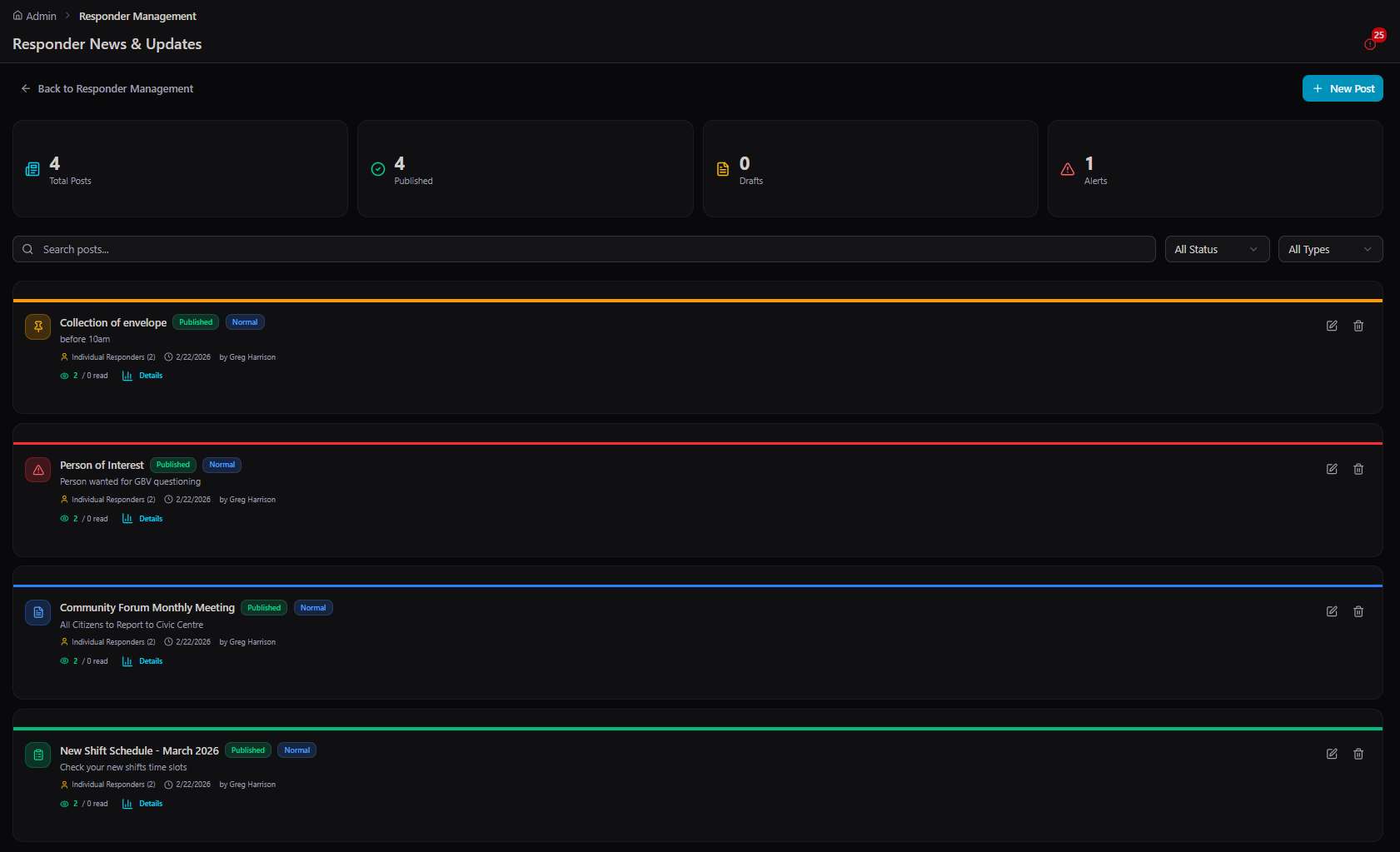
News & Updates is the platform's internal communications channel for field personnel. Instead of relying on WhatsApp groups, email chains, or verbal handovers, publish structured posts that appear in every responder's app — with read receipts, so you know who got the message and who didn't.
News and Updates post list
News & Updates → the broadcast feed: bulletins, assignments, and notices with priority bars and read receipts
Read Receipts modal
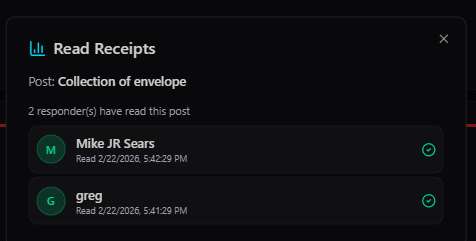
Read Receipts → per-post confirmation of exactly who has seen a bulletin, and when
📣
Post types
Bulletin (general information), Assignment (a specific task for named individuals), Alert (urgent operational notice), and Notice (formal instruction). Each type has a distinct visual style in the responder app.
🎯
Audience targeting
Send to Global (everyone), specific Communities (a site or area), or Individual responders (select by name). An assignment to collect an envelope only needs to reach the three relevant responders — not the entire 200-person roster.
📎
Multimedia attachments
Attach images, videos, PDFs, Word documents, and Excel files to any post. Share a new shift schedule, a person of interest photo, or a site access map — all delivered to responders' devices in one tap.
Read receipts
See exactly who has read each post and when. For critical assignments or safety notices, this is your proof of communication — no "I didn't know" responses from the field.

Priority levels

🟢 Normal
Routine communications, schedule updates, general notices
🟡 High
Time-sensitive information requiring prompt attention
🔴 Critical
Immediate action required — triggers push notification priority
🚀 What gets posted to the fieldReal use cases
Person of interest bulletin New shift schedules Monthly meeting notices Envelope / parcel collection assignment Site access map update Customer visit instructions Safety alert broadcast Territory changes for sales reps Equipment maintenance notice
Module 08

Tactical Teams

Build standing specialist teams ready to be deployed into Special Ops at a moment's notice.

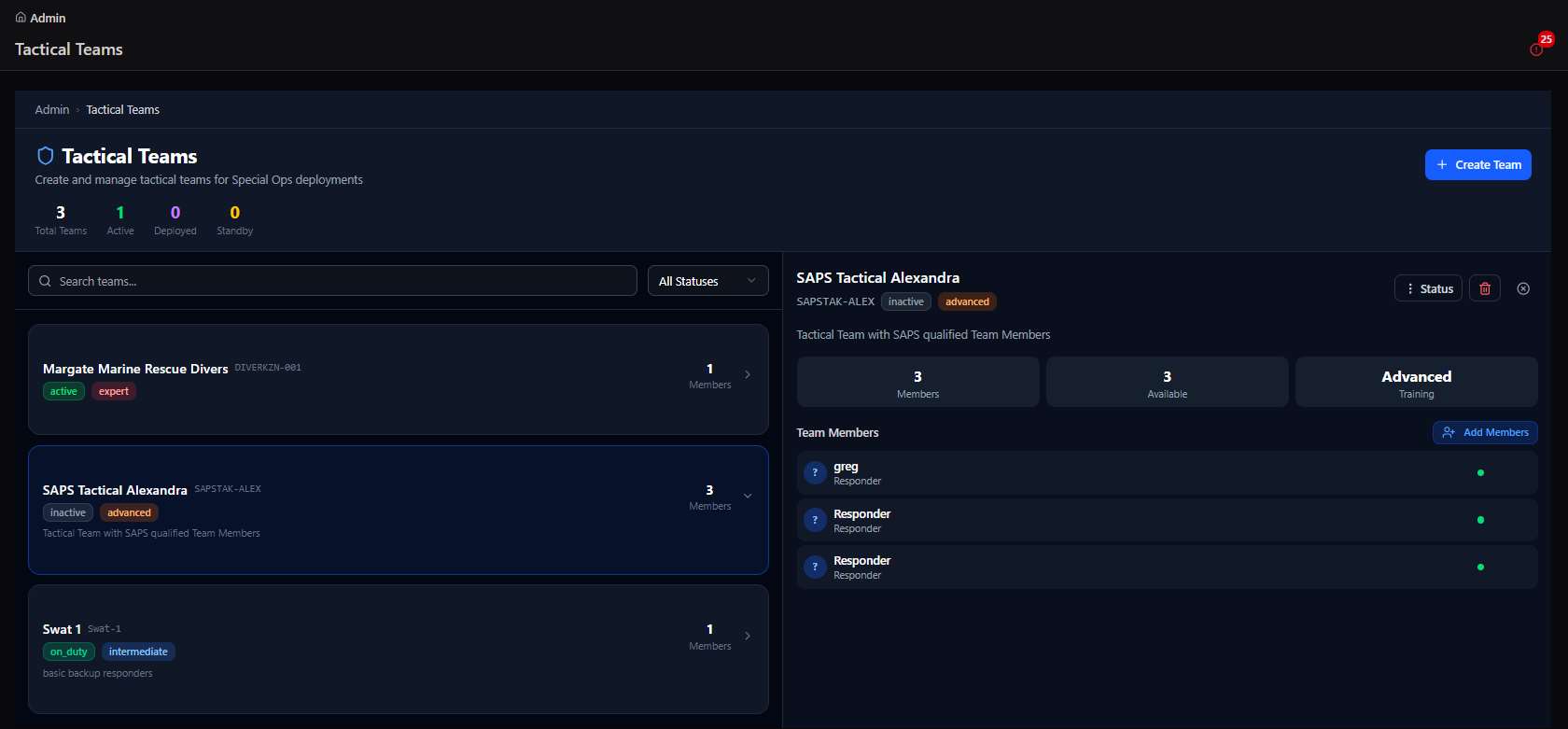
Tactical Teams are pre-configured groups of responders with a shared function, readiness level, and deployment mandate. They exist as standing units — defined, staffed, and graded — so that when a Special Op is created, you assign a team rather than building one from scratch under pressure.
Tactical Teams list and detail
Tactical Teams → standing units with training grade and live membership; the side panel shows team composition and readiness
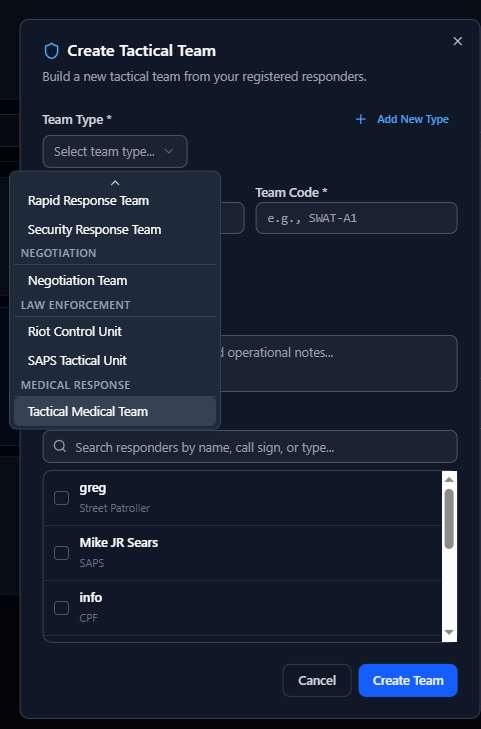
Create Tactical Team modal
Create Tactical Team → pick a team type and add registered responders by name, call sign, or role

Team types available

⚡ Rapid Response
Fast-moving, first-on-scene response capability
🛡️ Security Response
Physical security and perimeter control
🤝 Negotiation Team
Conflict resolution and hostage negotiation
🚔 Riot Control Unit
Crowd management and riot response
👮 SAPS Tactical Unit
South African Police Service tactical team
🏥 Tactical Medical
Medical support and MEDEVAC capability

Team configuration

🏷️
Team code
Every team gets a unique code (e.g., SAPSTAR-ALEX, SWAT-1, DIVERN225-001) used in radio communications, map labels, and operation briefings.
📊
Training grade
Teams are rated: Basic, Intermediate, Advanced, or Expert. Grade determines which Special Ops a team is eligible to be assigned to — ensuring you never send an underprepared team to a critical operation.
👥
Member management
Search responders by name, call sign, or type to add to a team. View each member's availability and certification status. The team panel shows total members, available members, and current training grade.
🌐
External team invitation
Invite teams from outside your organisation — e.g., SAPS, a partner security company, or a municipality unit — with their own team name, contact info, default role, call sign, and sector assignment.
🚀 Tactical Teams beyond securityDeployment spectrum
Disaster response (flood, fire, earthquake) Search & rescue Marine rescue divers Joint municipal operations NGO emergency deployment Events rapid response Corporate crisis management

From the platform: The Margate Marine Rescue Divers, SAPS Tactical Alexandra, and SWAT teams seen in the live platform demonstrate that Tactical Teams is designed for real, multi-agency joint operations — not just single-company security deployments.

Module 09

Special Ops

Plan, brief, deploy, command, and debrief any mission — from community patrols to joint law enforcement operations — through a structured 7-phase lifecycle.

Special Ops is the crown module of the Responder Management system. It takes every other module and brings them together into a single, structured operational workflow. When you create a Special Op, you're not just creating a task — you're opening a mission command centre that carries the operation from initial planning through live tactical deployment to final debrief and after-action reporting.

The 7-phase mission lifecycle
Draft
Initial creation
Planning
Teams & readiness
Map Setup
Tactical mapping
Briefing
SMEAC + comms
Deployment
Live mission
Debrief
AAR
Completed
Archived
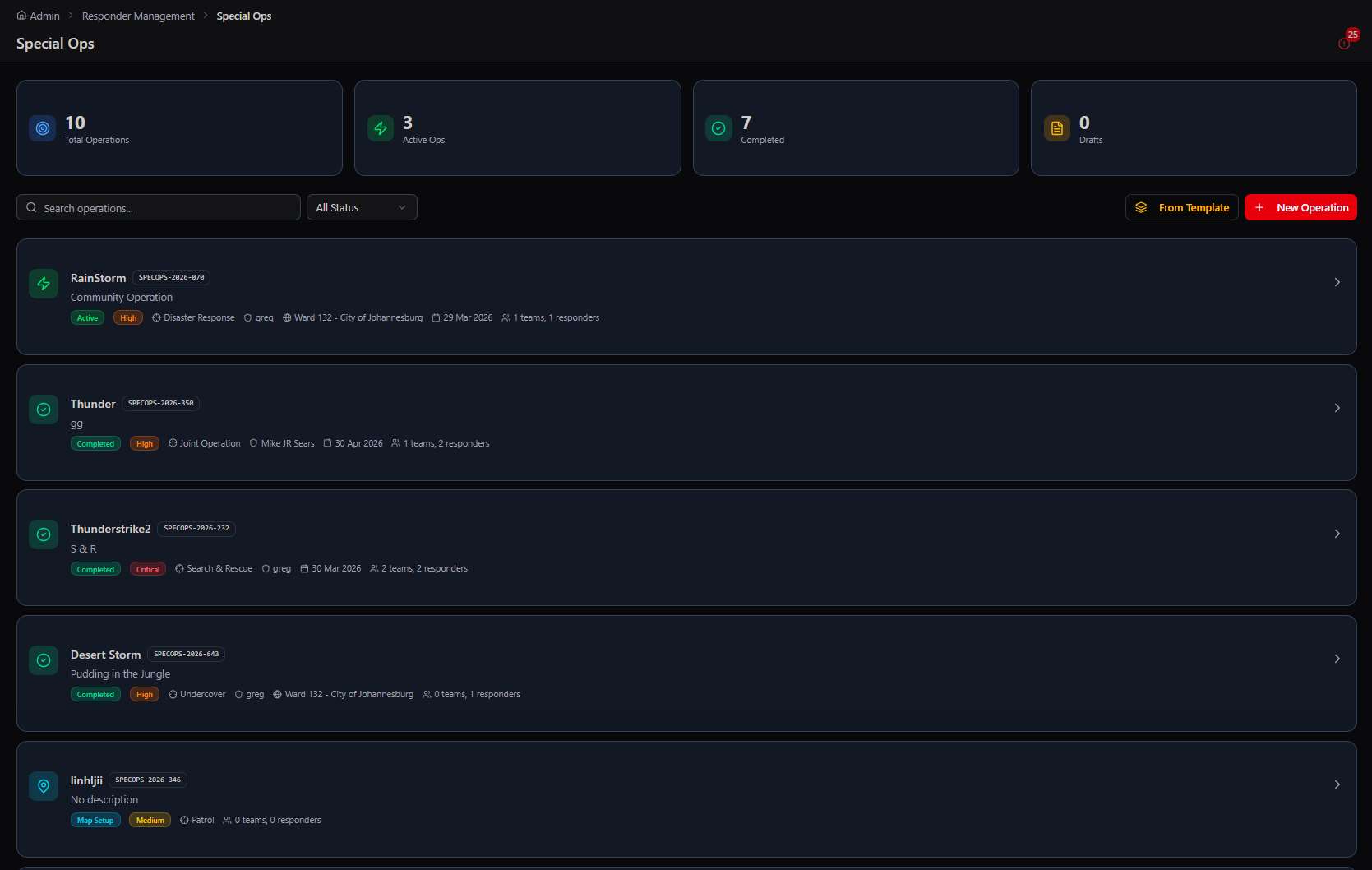
Special Ops operations list
Special Ops → the operations register: every mission with its phase, priority, and commander at a glance
Create New Operation form
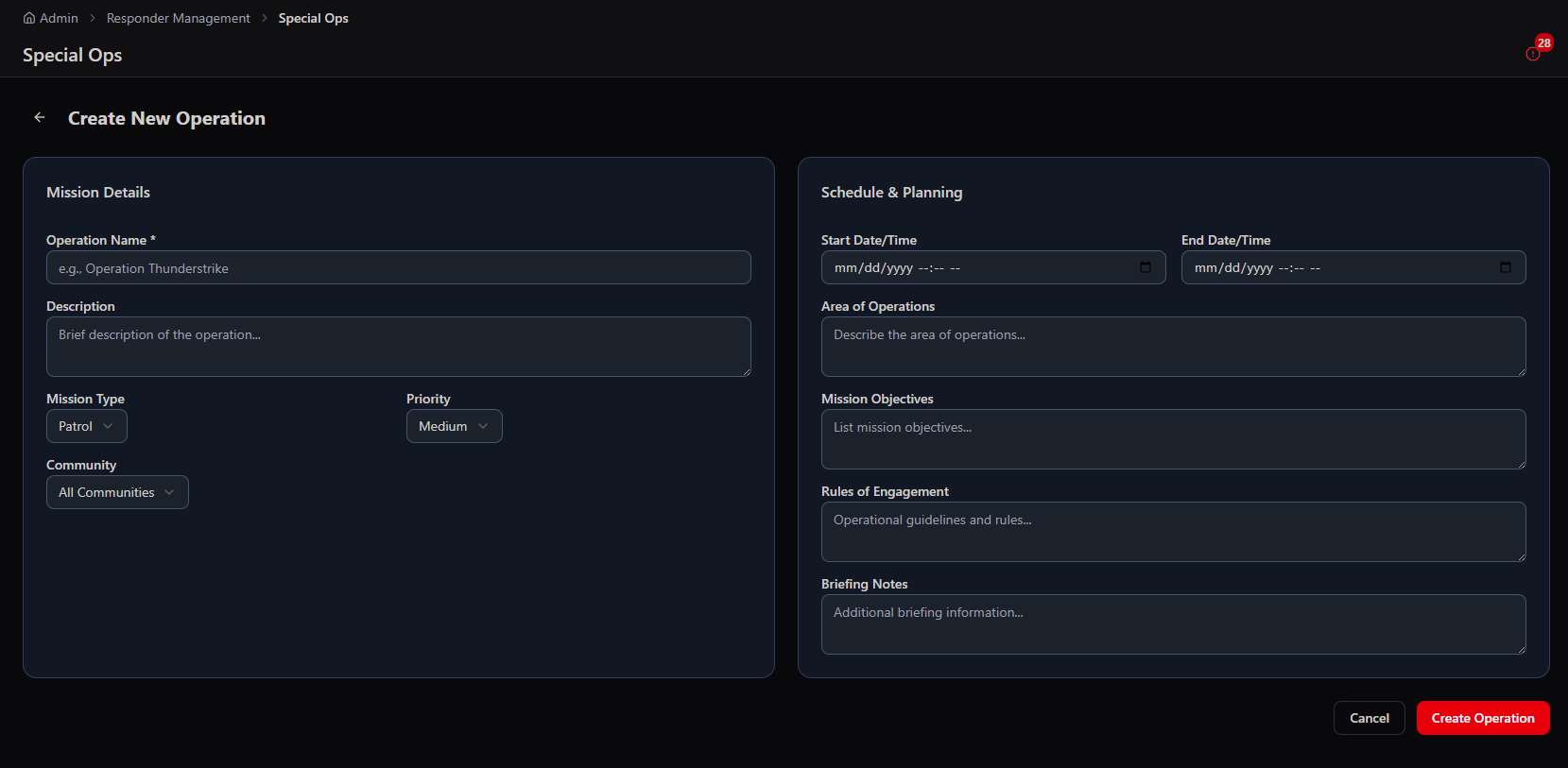
Phase 1 · Draft → Create New Operation: mission details, type, priority, area of operations, objectives, and schedule

Planning Phase

Assign a mission commander, add tactical teams and individual responders, track commander acceptance and team acknowledgements. A planning readiness progress bar shows 0–100% — the operation cannot advance to Map Setup until all required confirmations are in.
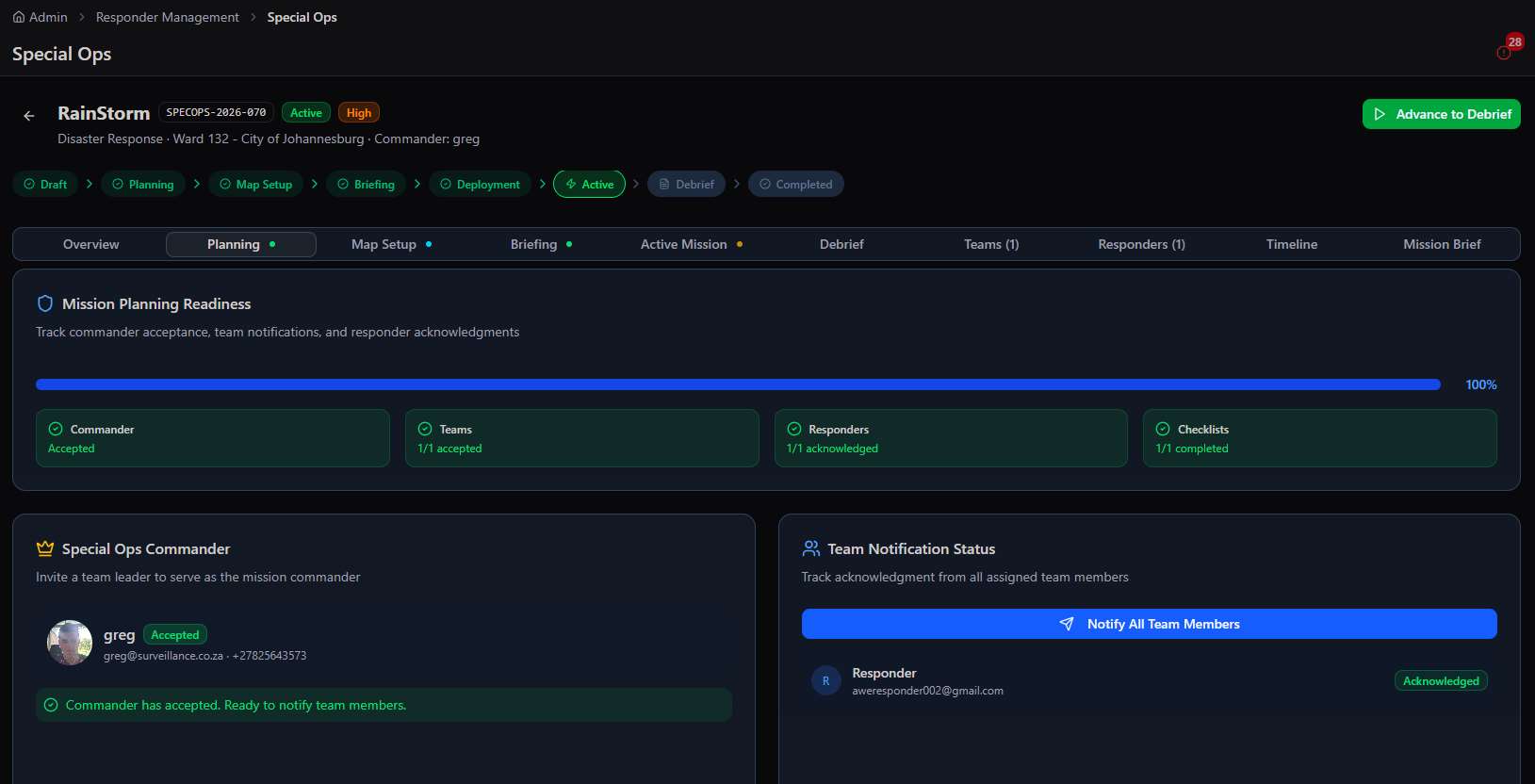
Special Ops planning readiness
Phase 2 · Planning → readiness tracking: commander acceptance, team acknowledgements, and a 0–100% gate to advance

Map Setup — Live Tactical Map

A full-featured tactical operations map with satellite, terrain, 3D, and road views. Place Points of Interest (POIs) from a rich library: Medical, Hazard, Extraction Point, Command Post, Objective, Observation Post, Comms Relay, Water Source, Shelter, Landing Zone, Casualty Point, and more. Draw geofence zones. Place responder breadcrumb routes. Switch between map presets (Night Ops, Search Mode, Surveillance, Tactical 3D) designed for different operational environments.
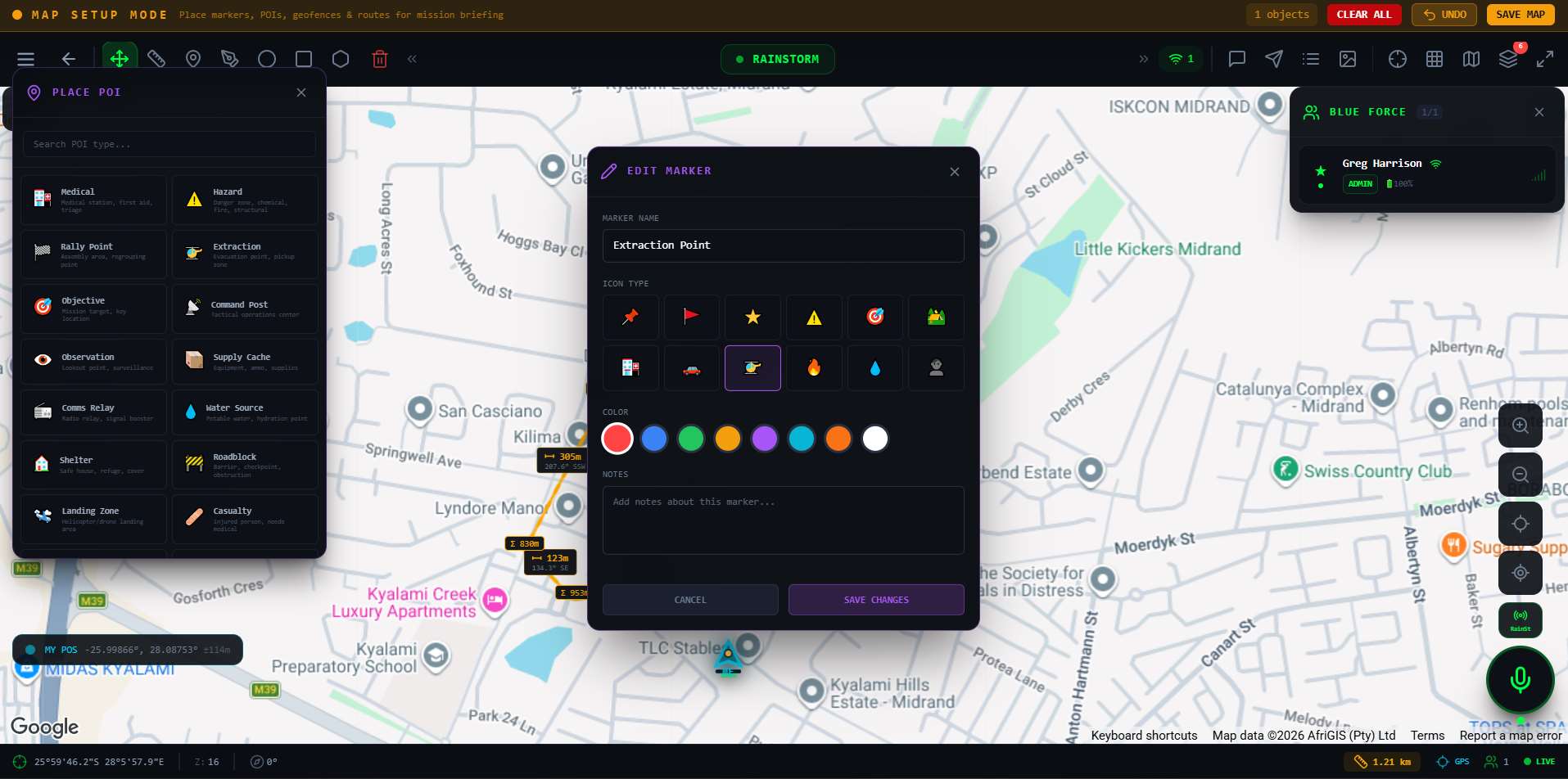
Tactical map POI editor
Phase 3 · Map Setup → placing a Point of Interest on the live tactical map with the marker icon and colour library open
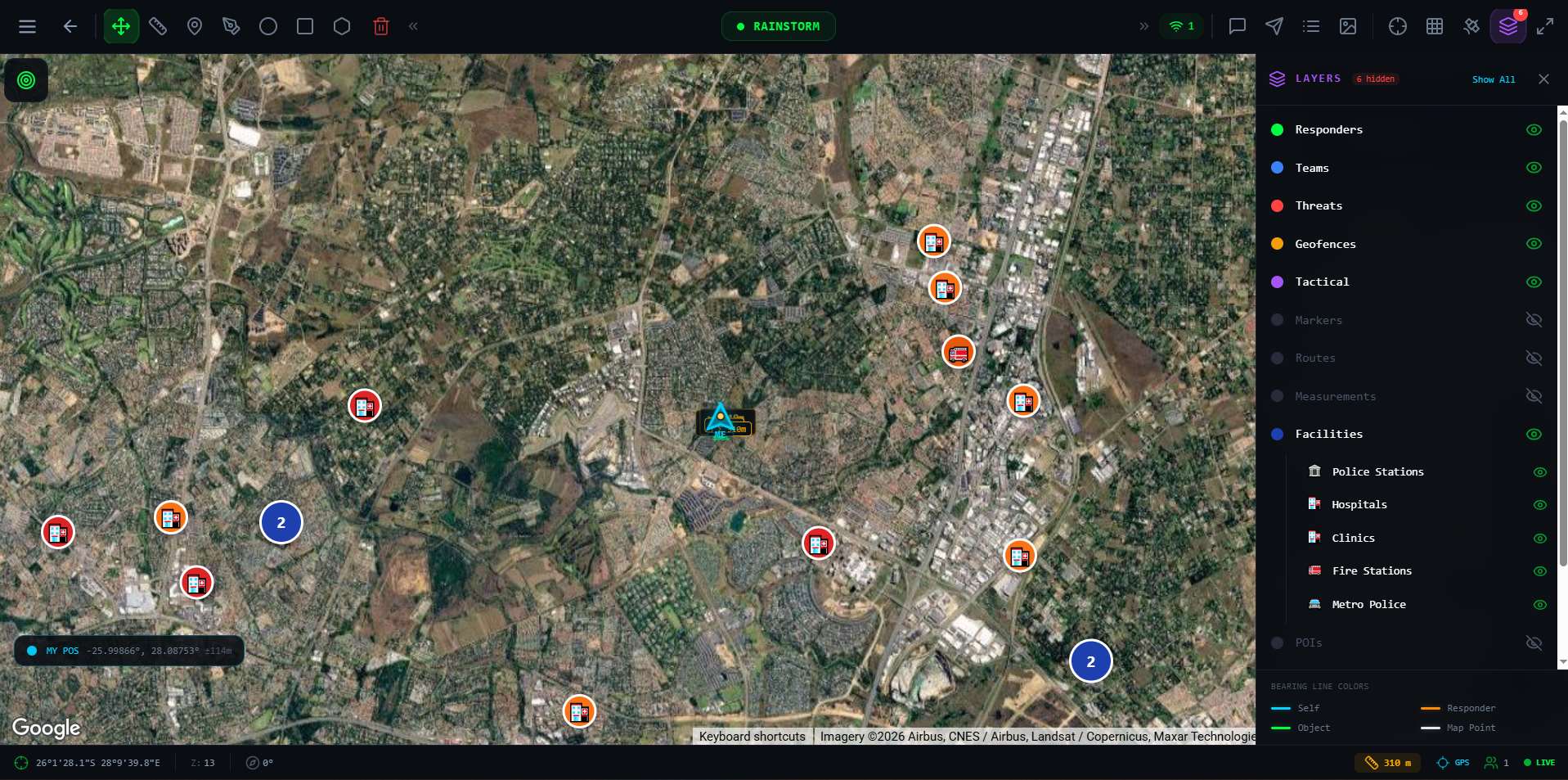
Tactical map with layers panel
Live map → toggle layers: teams, threats, geofences, and facility POIs (hospitals, police, fire)
3D tactical map view
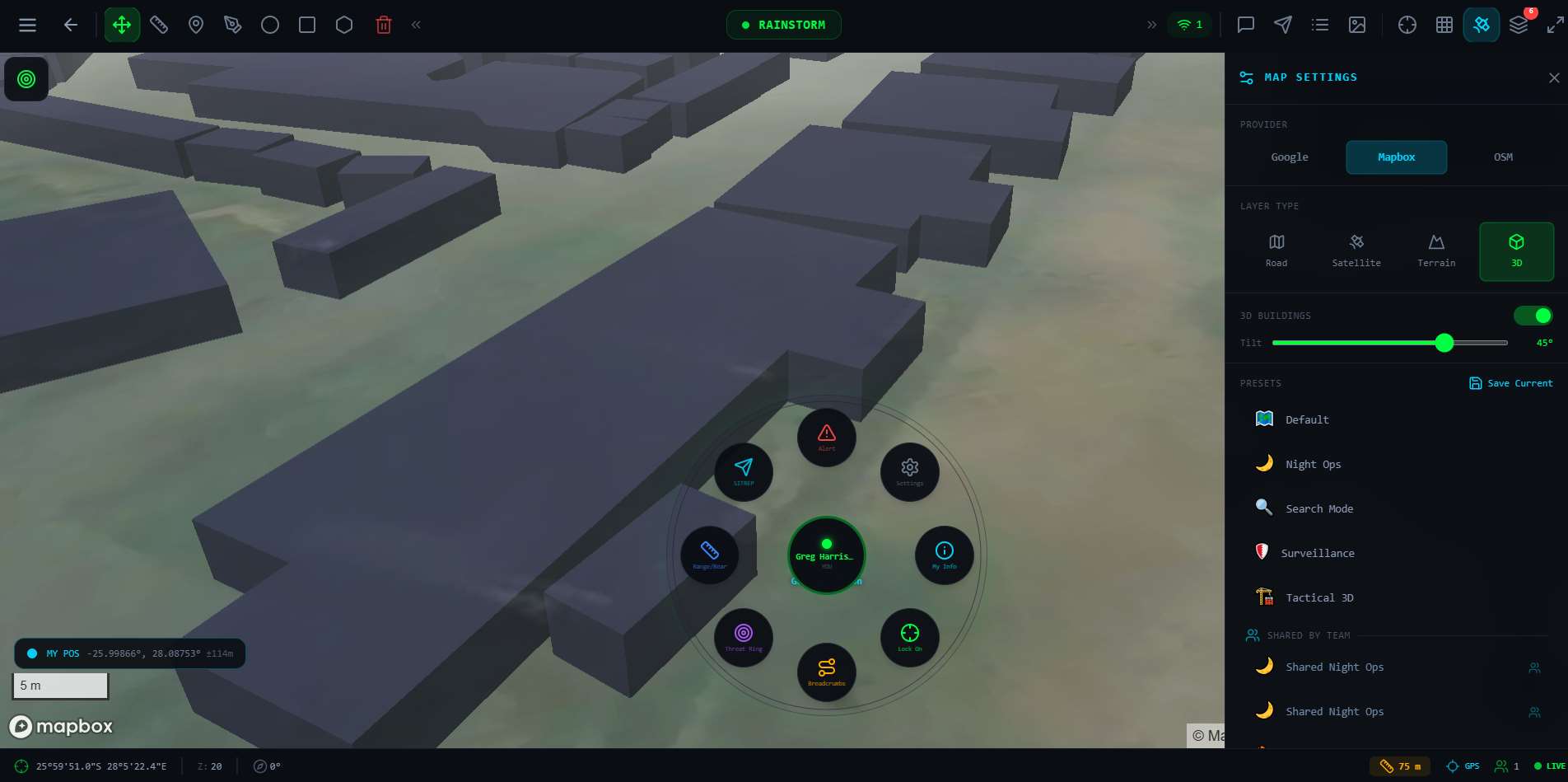
Tactical 3D → the same operation rendered in 3D terrain with the radial quick-action tool ring
🗺️
3D map mode
Switch to Mapbox 3D view with full building extrusion for urban tactical planning. Responders appear on a true 3D model of the area of operations — invaluable for SWAT-style deployments in complex building environments.
📡
Real-time responder tracking
See every deployed responder's live GPS position on the tactical map. Separate layer controls for Responders, Teams, Threats, Geofences, Tactical markers, Facilities (hospitals, police stations, fire stations).
💬
TAC Chat
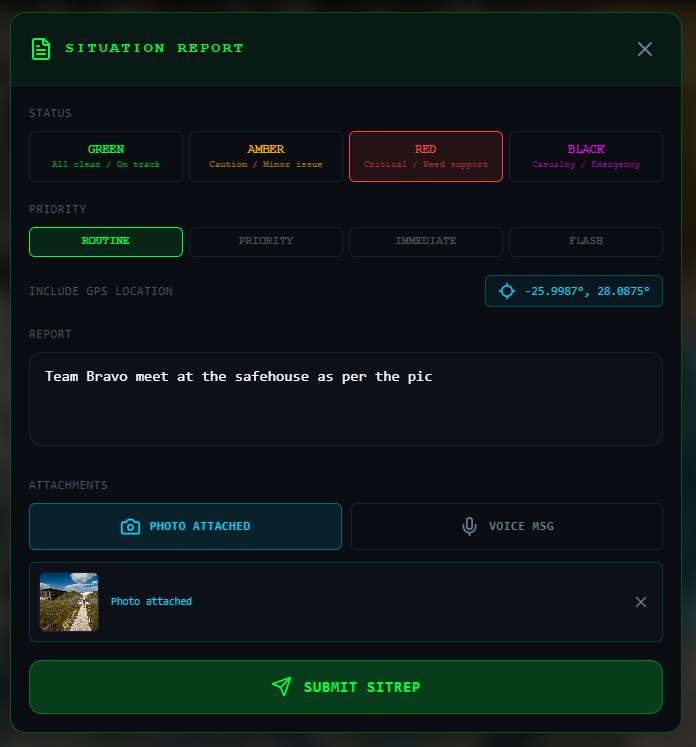
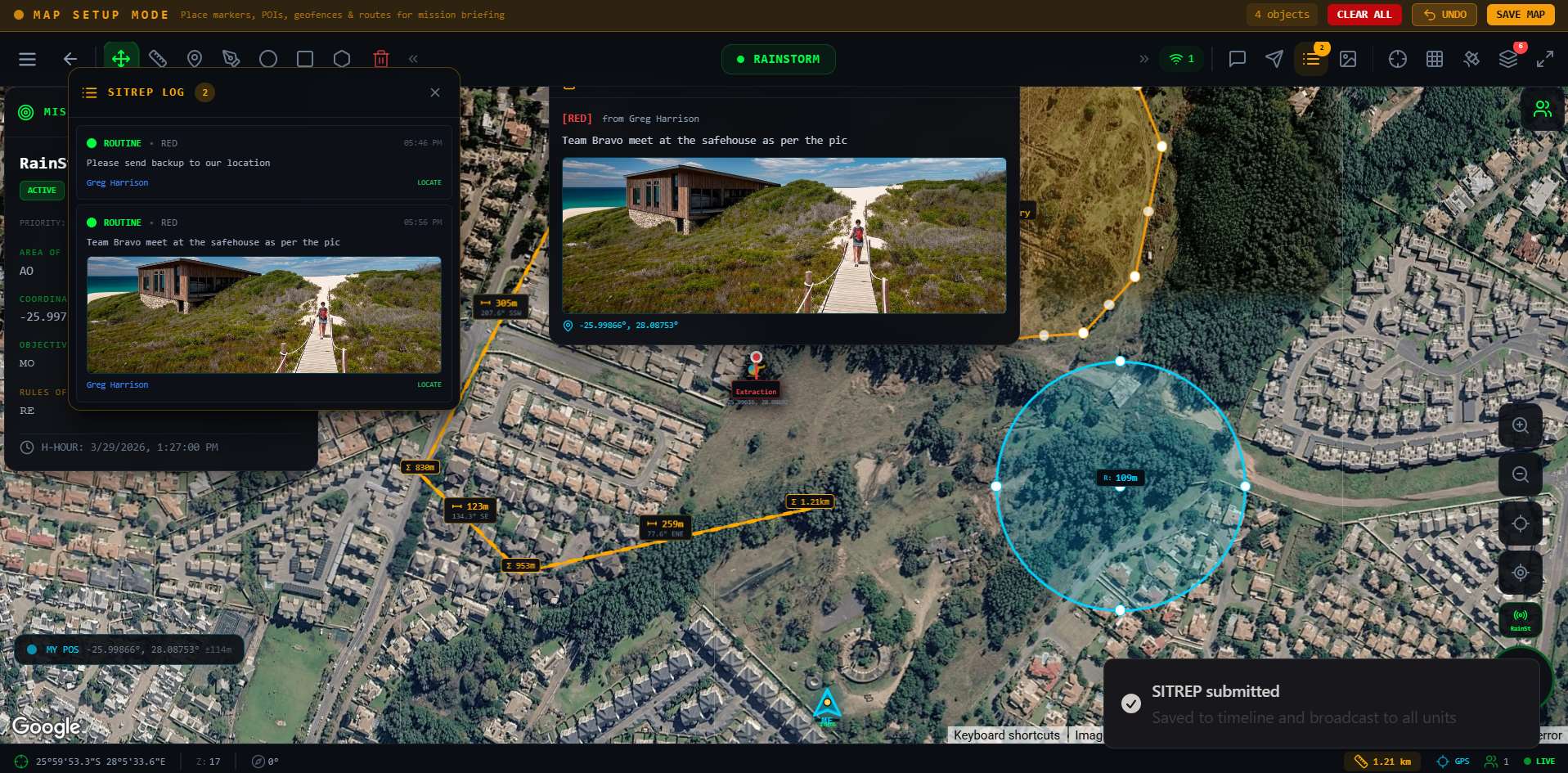
An embedded tactical chat channel visible to all mission participants. Priority messages (Routine, Security, Immediate, Flash) appear with distinct colour coding. Responders can send SITREPs directly from their map view into TAC Chat.
📸
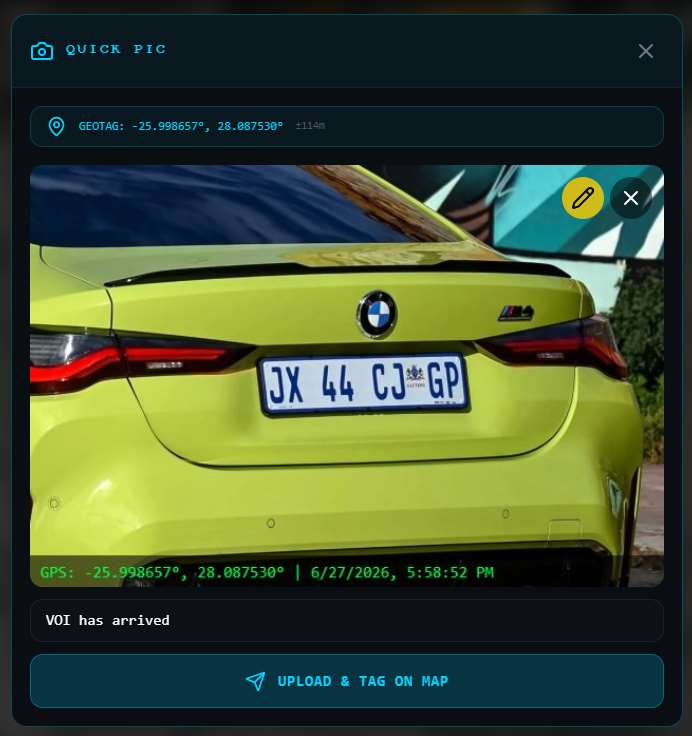
Quick Pic — geo-tagged evidence
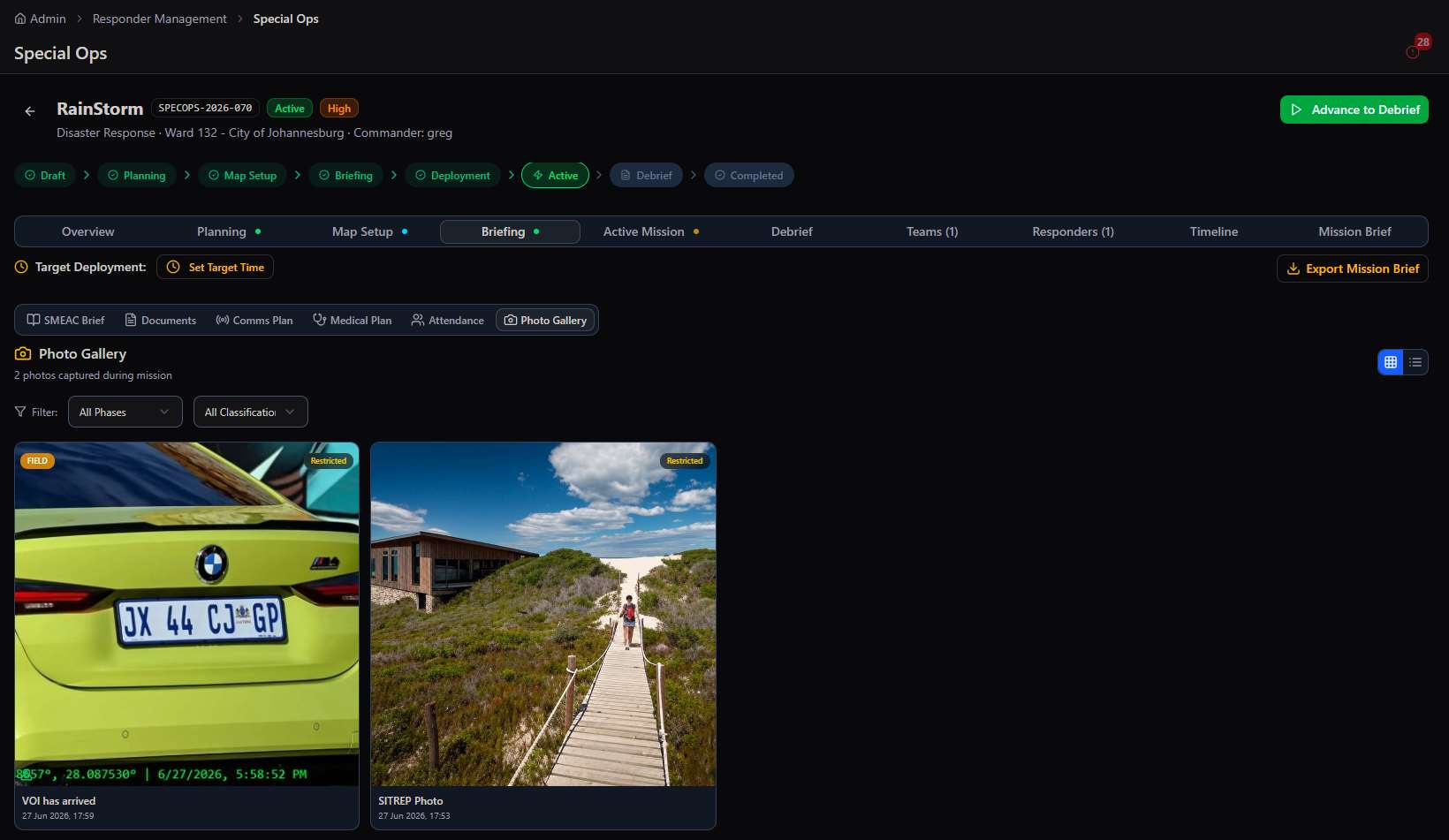
Responders capture photos from the field which auto-upload with GPS coordinates and timestamp. The "VOI has arrived" photo example shows a Gauteng number plate captured in the field — tagged to the map and logged to the mission photo gallery.

Briefing Phase

The Briefing module uses the military SMEAC format — Situation, Mission, Execution, Admin/Logistics, Command/Signal — as the structured briefing template. Admins fill in each section of the SMEAC before deployment. Additional briefing components include:

  • Communications Plan — call signs for Command Post, Teams Alpha/Bravo/Charlie, Medical, and Transport, plus radio frequencies and code words
  • Comms Check — a digital ping to all mission participants to confirm radio readiness before deployment
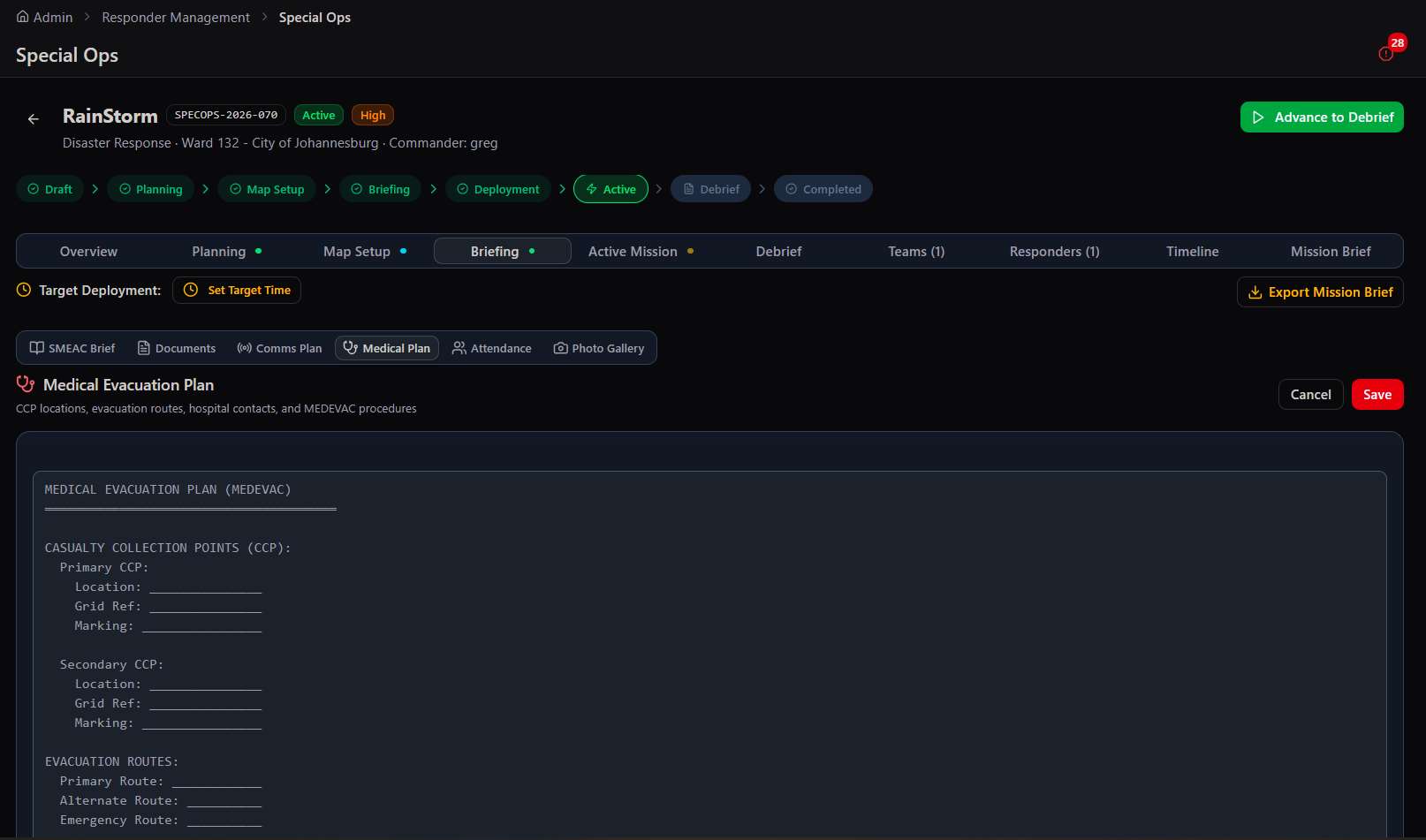
  • Medical Evacuation Plan (MEDEVAC) — Casualty Collection Points with grid references, primary and alternate evacuation routes, hospital contacts
  • Briefing Attendance — track which responders attended the briefing; a prerequisite for deployment authorisation
  • Photo Gallery — all field photos submitted during planning and active phases, filterable by phase and classification
  • Export Mission Brief — generates a complete printable PDF of all briefing materials for physical distribution
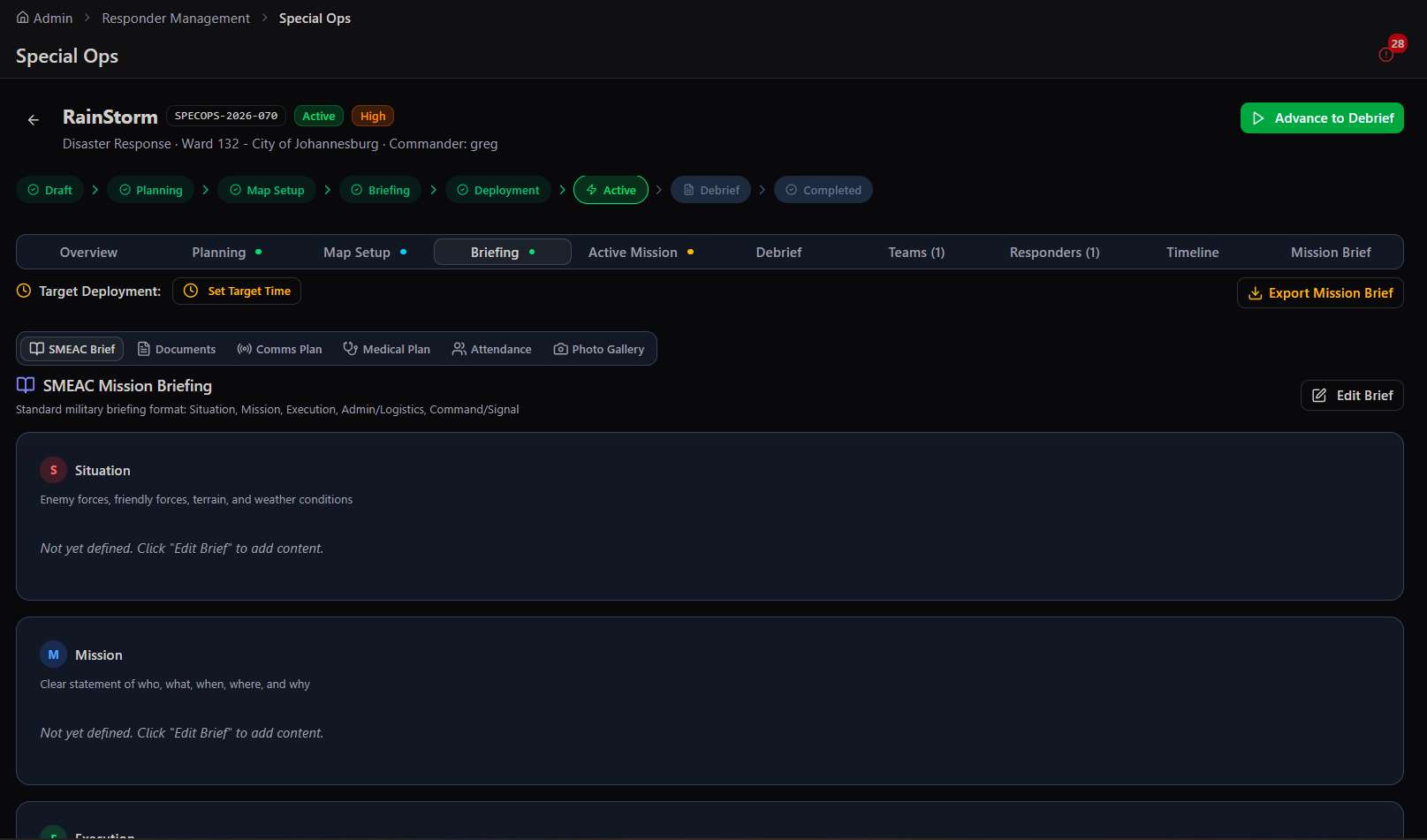
SMEAC briefing screen
Phase 4 · Briefing → the SMEAC mission briefing, with Documents, Comms Plan, Medical Plan, Attendance, and Photo Gallery tabs
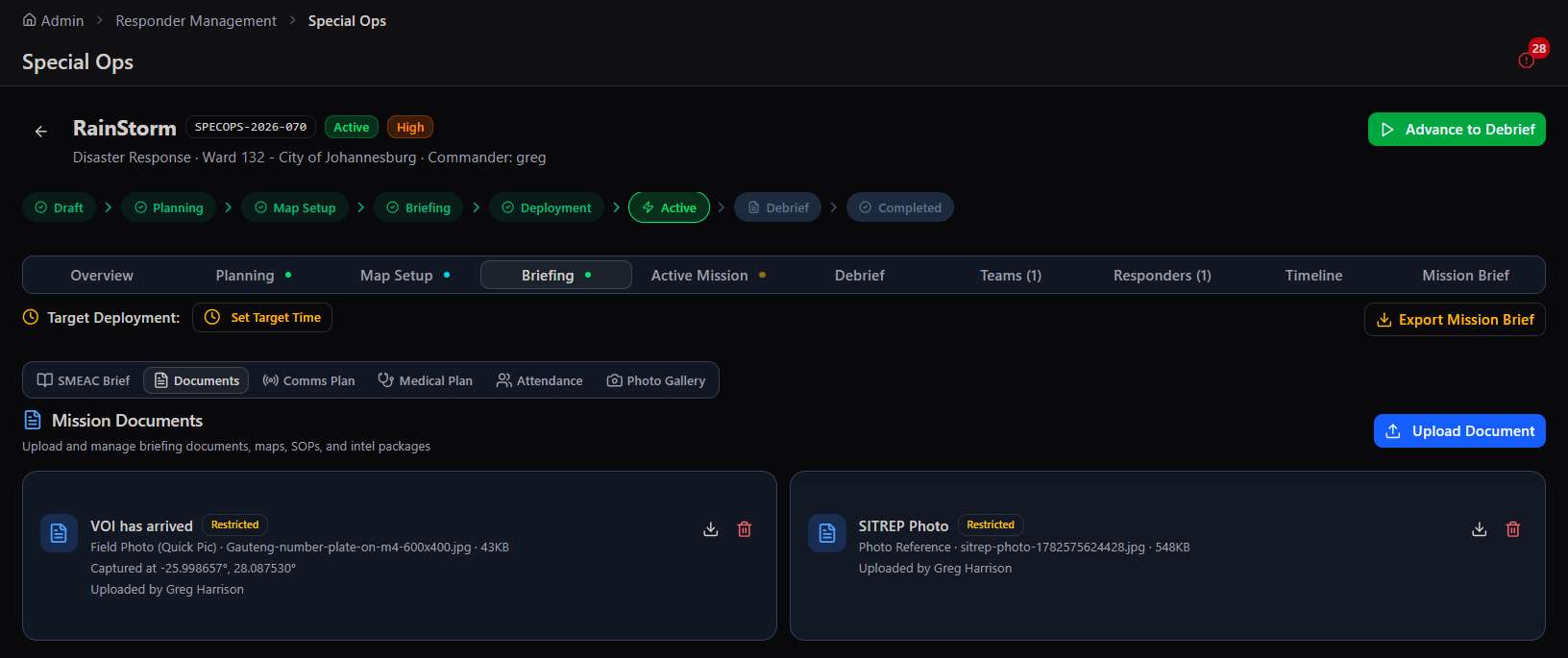
Briefing Documents tab
Documents → mission maps, imagery, and intel packages attached to the operation
Medical Plan tab
Medical Plan → casualty collection points and MEDEVAC routes captured before deployment
Briefing Photo Gallery tab
Photo Gallery → geo-tagged evidence photos from the field, filterable by phase and contributor

Active Mission Phase

The Active Mission screen shows: live mission timer (counting up from deployment), active teams count, active responders count, the Emergency Recall button, and a Partial Recall tool to pull back specific teams without ending the mission. A Team Status Board shows every assigned team's current status (Deployed, Recalled, Standby).

Emergency Recall: a single button that broadcasts an immediate recall signal to every responder and team on the mission. All team members receive a push notification on their devices. The mission remains active but all personnel are ordered to return to base. Used when conditions change rapidly during a live operation.
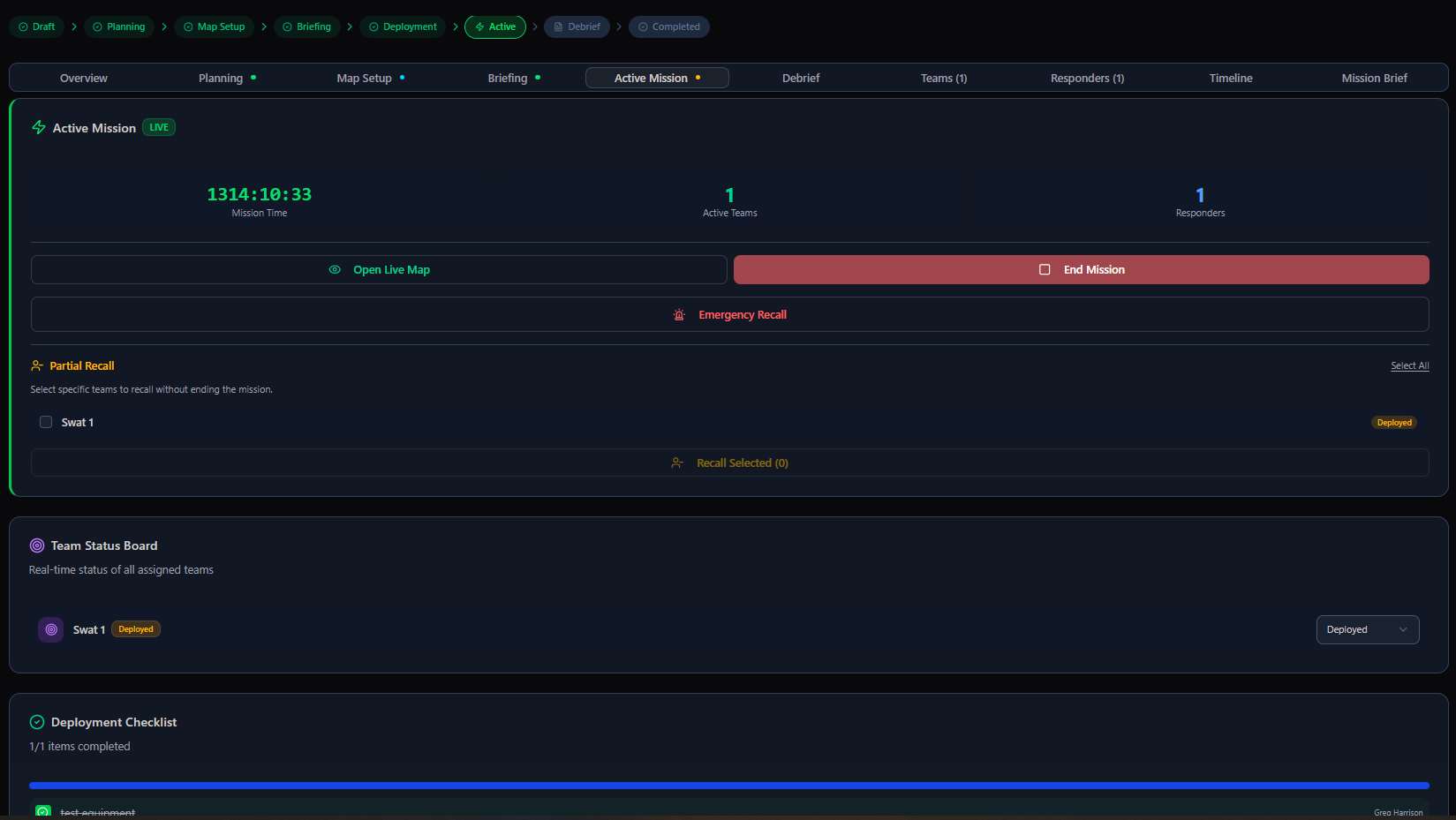
Active Mission command screen
Phase 5 · Active Mission → live mission timer, active team and responder counts, Emergency Recall, and the Team Status Board
Live map with field SITREPs
On the live map → field SITREPs and photos surface at their exact coordinates as responders submit them
Situation Report modal
SITREP → status (Green/Amber/Red/Black), priority, GPS locator, and photo attachments
Quick Pic capture
Quick Pic → snap geo- and time-stamped evidence and drop it straight onto the mission map

Debrief & After-Action Report (AAR)

The Debrief phase generates a comprehensive After-Action Report covering: Executive Summary, Objectives Assessment (Met / Partially Met / Not Met), Challenges & Issues, Recommendations, Incident Log, Lessons Learned (with template loading), Team Performance Assessments (star ratings per team), and the SITREP Log Export (full PDF of all situation reports and voice transcripts from the mission). The completed operation can be saved as a Future Operation Template — reuse the entire SMEAC, comms plan, medical plan, and checklist for recurring mission types.
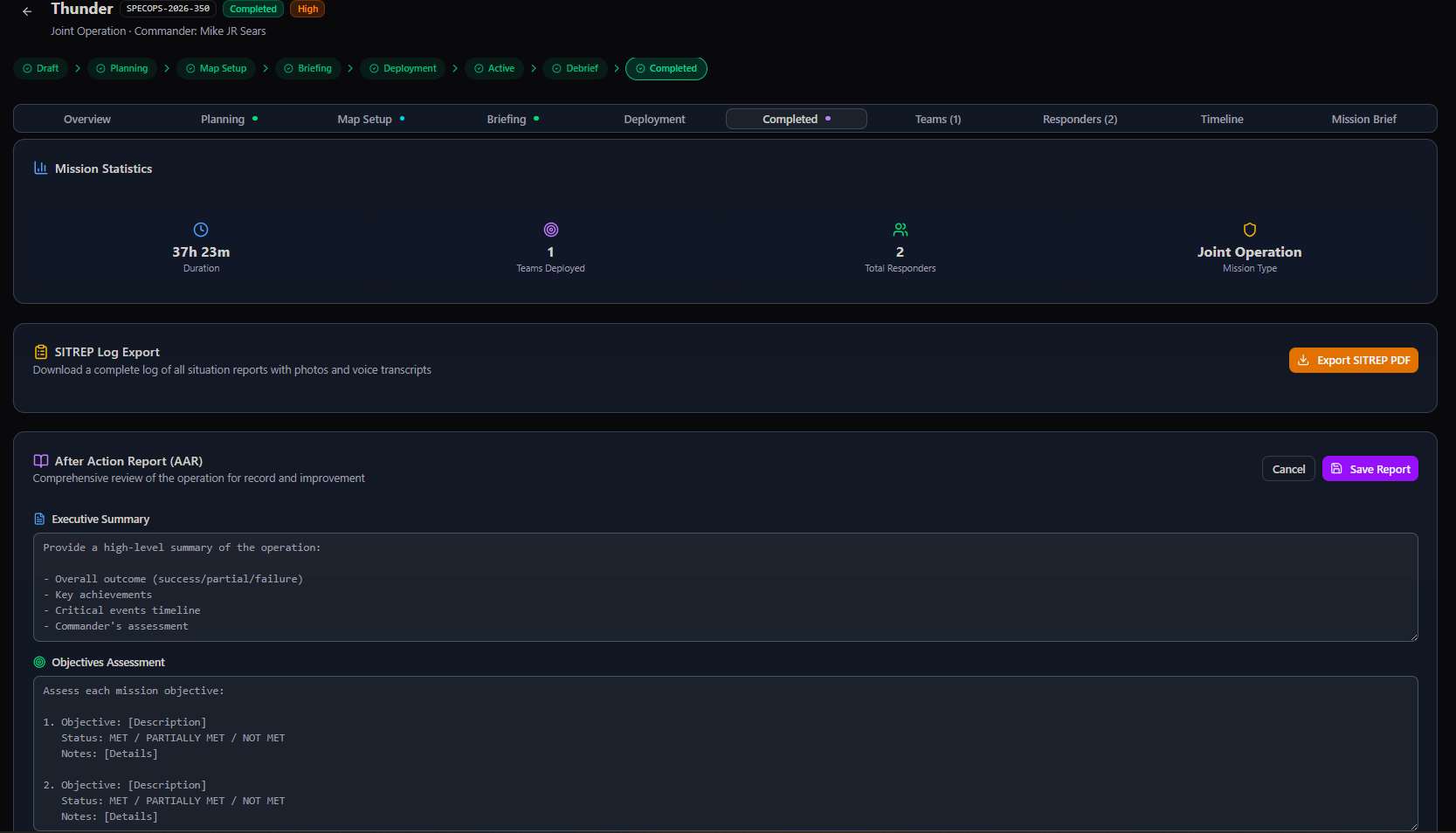
Debrief and After-Action Report
Phase 6 · Debrief → the After-Action Report: mission statistics, objectives assessment, AAR narrative, and SITREP log export
7
Structured mission phases
3D
Urban tactical map mode
SMEAC
Military briefing format built in
🚀 Special Ops beyond the obviousAny planned, coordinated field operation benefits from this module
SAPS joint operations Disaster response coordination Search & rescue missions Major event security deployments Undercover operations Multi-site coordinated inspections Corporate office relocations (moving teams) Large-scale maintenance shutdowns Political protection detail Film/TV location security VIP protection Cross-border operations

From the live platform: Operations running in the system include RainStorm (Disaster Response, Ward 132, City of Johannesburg), Thunder (Joint Operation with SAPS), Thunderstrike2 (Search & Rescue), and Desert Storm (Undercover). These are real operational deployments demonstrating that the platform is live, mission-tested, and handling multi-agency, multi-city operations today.

Complete platform. Any industry. No limits.

The Responder Management module — across all 9 of its integrated components — is designed as universal field workforce infrastructure. The underlying question it answers is simple: where are your people, are they safe, are they certified, what have they done, and what do they need to know? Those questions are as relevant for a plumbing company with 8 technicians as they are for a national security company with 2,000 guards or a municipality managing 150 field inspectors.

When you're ready to continue, the next sections of the Administration Platform cover the PSIM module, Communications, GeoSpatial, Intelligence, and Specialised Modules — each with the same depth of configuration and the same philosophy: every feature is built for scale, designed for any industry, and yours to configure without writing a line of code.