Every signal.
One picture.
Accessible.
Intelligence is the platform's fused command view — the same FaceMap, VOI, and WhatsApp classification engines from Specialised Modules, brought together with geospatial context into one exportable operating picture, and opened to partners via API.
The Layered Security Approach
No single sensor, sighting, or message tells the whole story. The platform's intelligence value comes from what happens when they're fused.
Every intelligence stream on the platform — a facial match, a plate scan, a WhatsApp message, a PSIM sensor trigger, an event pin on a map — is, on its own, a single data point. The platform's actual security doctrine is layered: each stream is thin by design, but stacked together across identity, community signal, and geospatial context, they produce a resolution no individual channel could reach alone.
Four layers, one operating picture
Fusion is the product. A WhatsApp report of a suspicious vehicle, a VOI Tracker plate match half a kilometre away twenty minutes later, and a PSIM perimeter trigger at a nearby site the same night aren't three unrelated alerts — layered together, they're one credible pattern worth a response.
Built to open outward
Every layer above is exposed through the platform's API — not walled off inside separate dashboards. Facial and vehicle match events, classified WhatsApp incidents, geospatial event feeds, and PSIM sensor states all resolve to the same underlying event and location model, which means a client's own operations centre, a municipal command system, or a private security control room can subscribe to exactly the slice of the bigger picture they need.
- One event schema — a facial match, a plate hit, a classified WhatsApp incident, and a PSIM trigger all become the same underlying Event object, with consistent location, severity, and timestamp fields.
- Consumable at any layer — clients can integrate at the raw sensor level, the classified-incident level, or the fully fused operating-picture level, depending on what their own systems need.
- Geospatial-first — every intelligence stream is geocoded on ingestion, so external GIS and command-and-control systems can plot AWE-sourced intelligence directly onto their own maps.
- Built for scale, not a single site — the same architecture that fuses a neighbourhood's WhatsApp chatter with one site's perimeter sensors scales to a city-wide or multi-site client footprint without redesign.
The bigger picture, on your terms. Clients who need visibility across all of this — not just one module's dashboard — integrate via API to receive the fused, geolocated intelligence picture directly into their own command environment, in real time. See Section 06 for how access is structured.
Intelligence Hub
The three AI-driven modules — FaceMap, VOI, and WhatsApp — grouped in their own sidebar destination, each with a dedicated tuning console.
Intelligence sits as its own item in the main sidebar, separate from Specialised Modules — a dedicated home for the platform's three AI classification engines. FaceMap and VOI Tracker each get the same Overview / Sightings / Audit / Map / Settings structure familiar from WhatsApp Intel, plus a Settings tab that tunes exactly how forgiving or strict their AI matching should be.
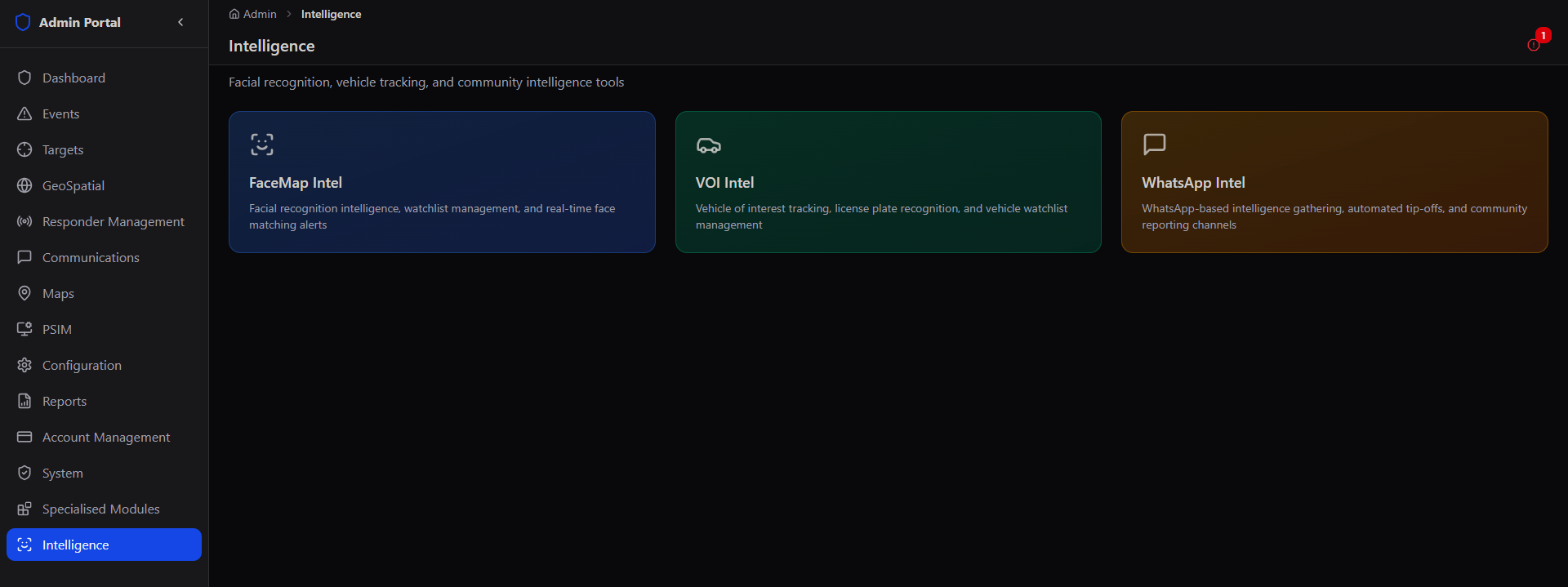
Same data, a dedicated front door. FaceMap Intel and VOI Intel here are the same underlying FaceMap and VOI Tracker modules from Specialised Modules — Intelligence is the console built specifically for tuning how their AI matching behaves day to day, and for the fused, API-accessible view of everything together.
FaceMap Intelligence
Tuning the single most important variable in facial recognition: how close a match needs to be before it counts.
The FaceMap Settings tab sets the maximum distance allowed between two face descriptors before they're called a match — stricter values sacrifice recall for near-zero false positives, more lenient values catch more matches at the cost of the occasional false alarm.
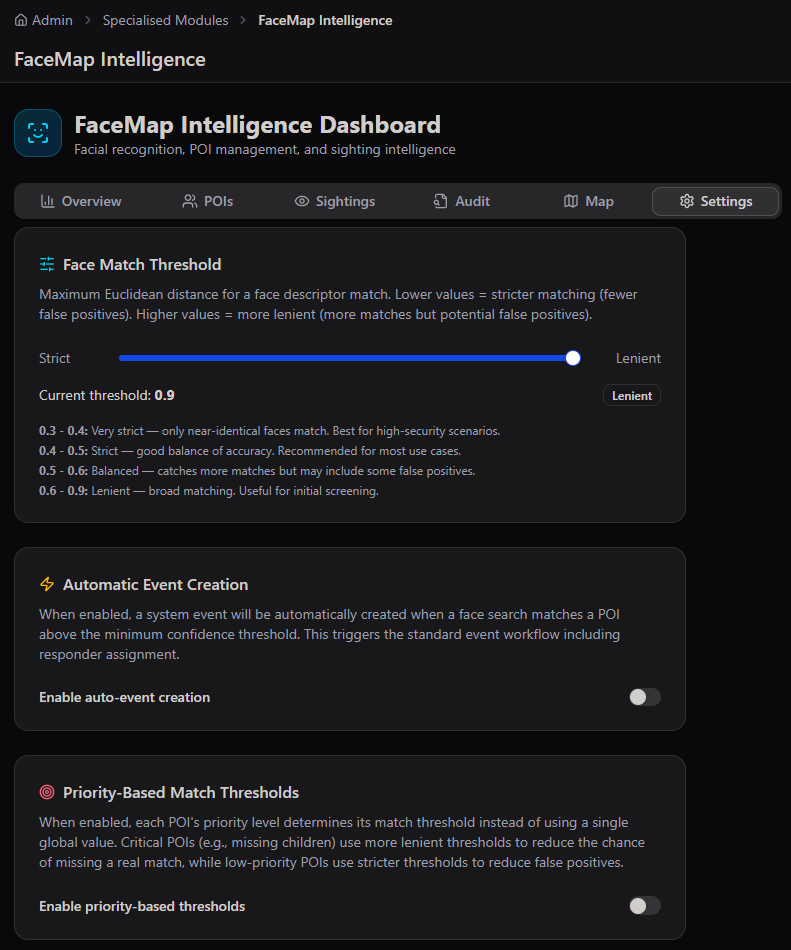
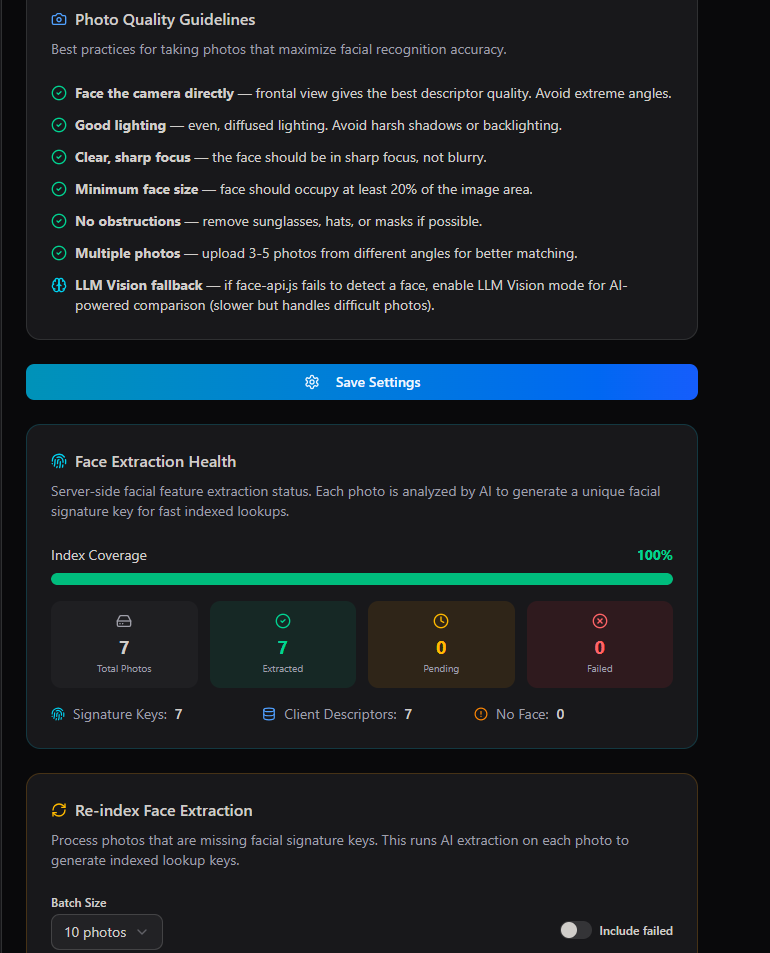
- Priority-Based Match Thresholds — when enabled, a POI's priority level sets its own threshold instead of one global value, so a Critical missing-child case matches more leniently while low-priority POIs stay strict to avoid false positives.
- Automatic Event Creation — a face match above the confidence threshold can auto-create a platform event, triggering the standard workflow including responder assignment.
- Face Extraction Health — tracks Signature Keys, Client Descriptors, and any photos with No Face detected, with a one-click Re-index action for anything still pending.
VOI Intelligence
The same discipline as FaceMap, tuned for license plates instead of faces.
VOI Intelligence mirrors FaceMap's structure exactly — a confidence threshold for automatic event creation, and a set of capture guidelines specific to photographing plates well.
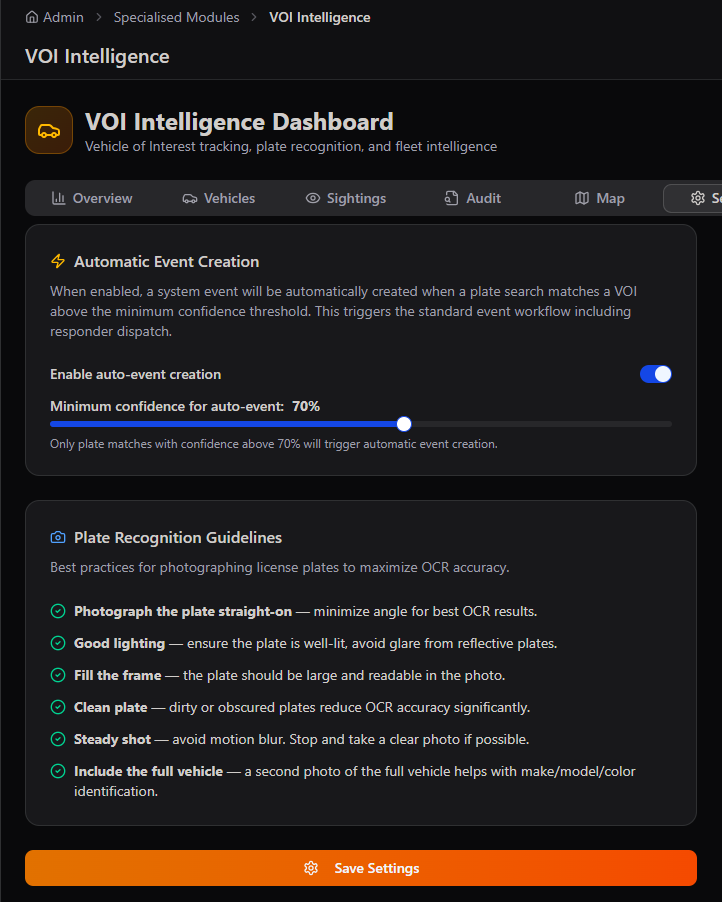
Guidance built into the tool. Both FaceMap and VOI Settings ship with plain-language photo capture guidelines — direct feedback that improves match accuracy at the point of data entry, not just after the fact in a training document.
WhatsApp Intel
The third card in the Intelligence hub — full detail lives in the Specialised Modules guide.
WhatsApp Intel is the third module in the Intelligence hub, reached the same way as FaceMap Intel and VOI Intel above.
See the full breakdown in Specialised Modules. The WhatsApp Intel Dashboard's 6 tabs and the 8-tab Intelligence Management console (Methods, Forwarding, Sessions, Keyword Radar, Feeds, Unified Feed, Threads, Pipeline) are covered in detail in the Specialised Modules Admin Guide, sections 06–07.
API Access & the Subscriber Model
The fused intelligence picture, delivered directly into a client's own systems — for organisations that need the bigger picture, not just a dashboard.
Beyond the dashboards covered in this guide, the entire fused intelligence layer — identity matches, classified community signal, and geospatial context — is available as a subscription API for government departments and organisations running their own large-scale data models or command systems.
How the model is accessed
Every intelligence stream resolves to the same underlying Event and Location model before it ever reaches the API, so a subscriber integrates once against a single, consistent schema — rather than stitching together separate facial recognition, vehicle tracking, and messaging feeds themselves.
Who subscribes, and at what level
What a subscription includes
- Authenticated API access — key-based access to the Unified Event API, scoped to the subscriber's geography, sites, or data categories.
- Real-time and batch options — live event streaming for operational command use, or scheduled batch exports for analytics and modelling workloads.
- Configurable data scope — subscribers choose which layers they need: identity matches only, classified community incidents only, geospatial/sensor state only, or the fully fused picture.
- Documentation and onboarding support — schema reference, sample payloads, and a technical onboarding session from our Dev Team for first integration.
Built for the bigger picture. Government departments and organisations that need visibility beyond a single dashboard — across identity, community signal, and geospatial data together — can subscribe via API to receive AWE's fused intelligence model directly inside their own systems. Chat to our Dev Team to scope an integration.